
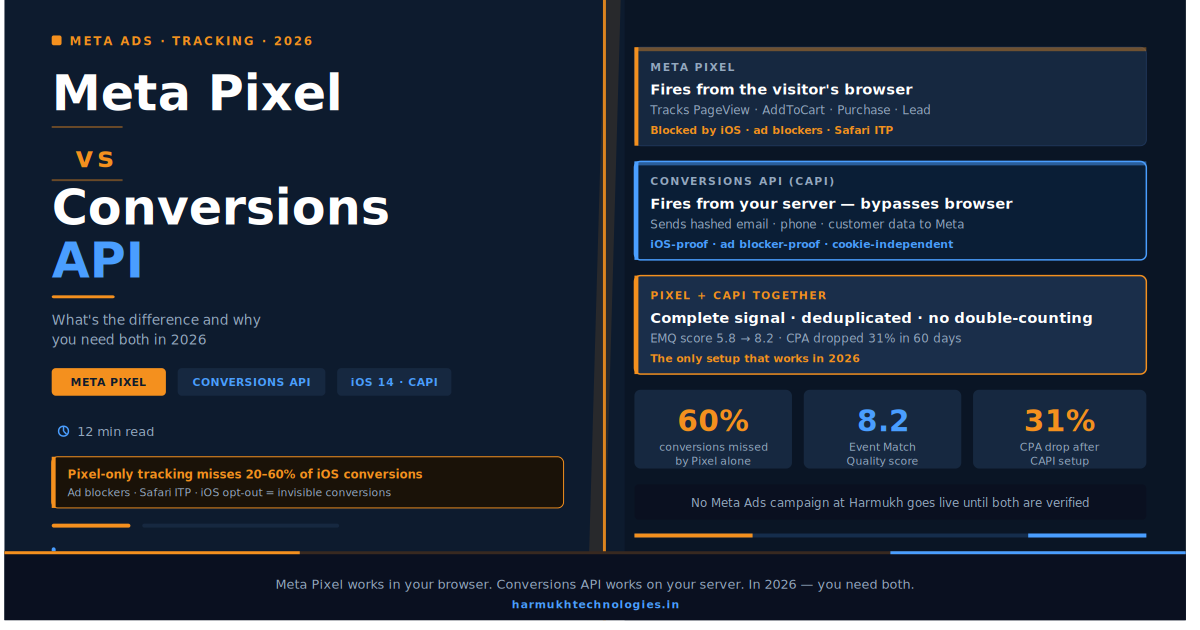
They are not two versions of the same thing. One lives in the browser. One lives on your server. In 2026, running only one of them means your Meta Ads are working with incomplete data — and incomplete data produces bad decisions that cost you money.
Harmukh Technologies
July 15, 2026 · 12 min read
Here is a situation that shows up in almost every Meta Ads account we audit.
A business has been running Facebook and Instagram ads for six to eighteen months. The Meta Pixel is installed — they can see that much in Events Manager. Conversions are showing up in the dashboard. The CPL looks reasonable. But when we ask them to pull their actual sales data and trace it back to their ad account, the numbers do not match. The platform is claiming conversions that the business cannot verify. Or it is undercounting conversions because a significant portion of their customers are on iOS devices where browser-based tracking no longer works reliably.
In most cases, the root cause is the same: the business is running the Meta Pixel alone, without the Conversions API. And in 2026, that is the same as navigating with half a map.
This post explains exactly what the Meta Pixel does, what the Conversions API does, why they are different tools designed for different environments, and why you need both running in parallel before you spend another rupee on Meta advertising. At Harmukh Technologies, no Meta Ads campaign goes live until both are verified firing correctly. Here is the reason why.
In This Article
- What Is the Meta Pixel — and What Does It Actually Track?
- The Problem With Pixel-Only Tracking in 2026
- What Is the Conversions API — and How Is It Different?
- Meta Pixel vs Conversions API — Side by Side
- Why You Need Both Running at the Same Time
- The Deduplication Problem Nobody Talks About
- How to Set Up Meta Pixel and CAPI Correctly
- How Better Tracking Directly Improves Your Ad Performance
What Is the Meta Pixel — and What Does It Actually Track?
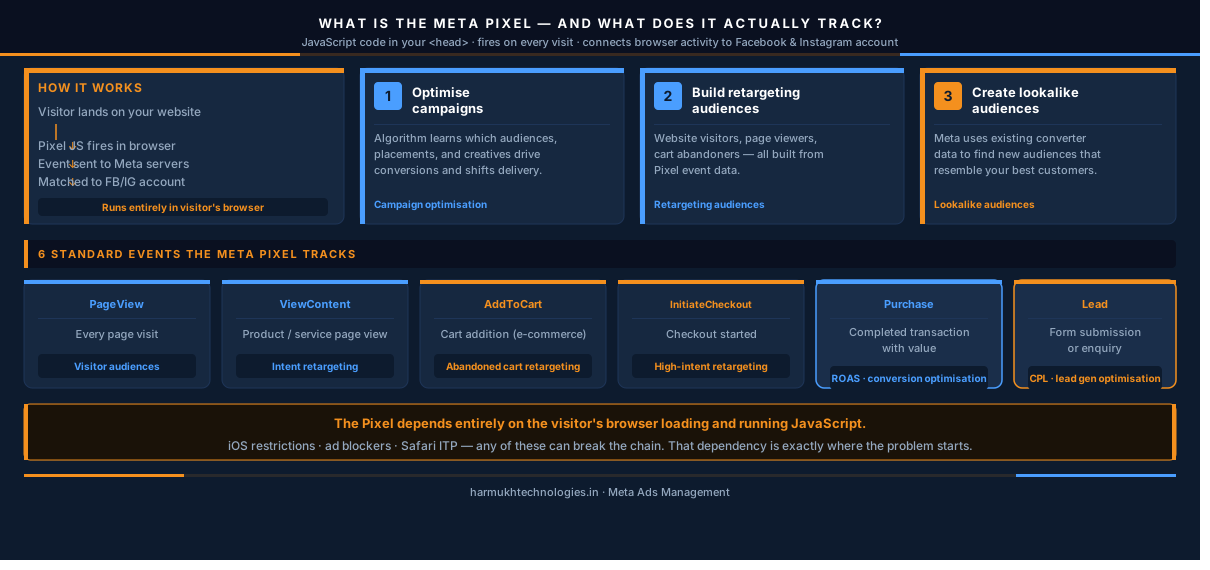
The Meta Pixel is a snippet of JavaScript code that you install in the <head> section of your website. When a visitor lands on any page of your site, the Pixel fires and sends data about that visit to Meta — which then connects the visitor’s browser activity to their Facebook or Instagram account.
This connection is what makes Facebook and Instagram advertising so powerful. When someone clicks your ad, visits your pricing page, adds a product to their cart, or completes a purchase — the Pixel records each of these actions and sends them back to Meta as events. Meta uses these events to do three things:
- Optimise your campaigns — Meta’s algorithm learns which audiences, placements, and creatives are producing conversions and shifts delivery accordingly
- Build retargeting audiences — website visitors, people who viewed specific pages, people who added to cart but did not purchase — all of these are only possible because the Pixel is tracking those events
- Create lookalike audiences — Meta uses your existing converter data to find new audiences who statistically resemble your best customers
The standard events the Meta Pixel tracks:
| Event Name | What It Tracks | Used For |
|---|---|---|
| PageView | Every page visit | Website visitor audiences |
| ViewContent | Specific product or service page view | Intent-based retargeting |
| AddToCart | Cart addition (e-commerce) | Abandoned cart retargeting |
| InitiateCheckout | Checkout started | High-intent retargeting |
| Purchase | Completed transaction with value | ROAS tracking, conversion optimisation |
| Lead | Form submission or enquiry | CPL tracking, lead gen optimisation |
The Pixel does all of this from the browser — meaning it depends on the visitor’s browser being able to load and run the JavaScript, and Meta being able to match that browser session to a logged-in Facebook or Instagram account. That dependency is exactly where the problem starts.
The Problem With Pixel-Only Tracking in 2026
The Meta Pixel worked reliably in a world where browsers freely accepted third-party cookies, where users stayed logged into Facebook across all their browsing sessions, and where no operating system restricted cross-app data sharing. That world no longer exists.
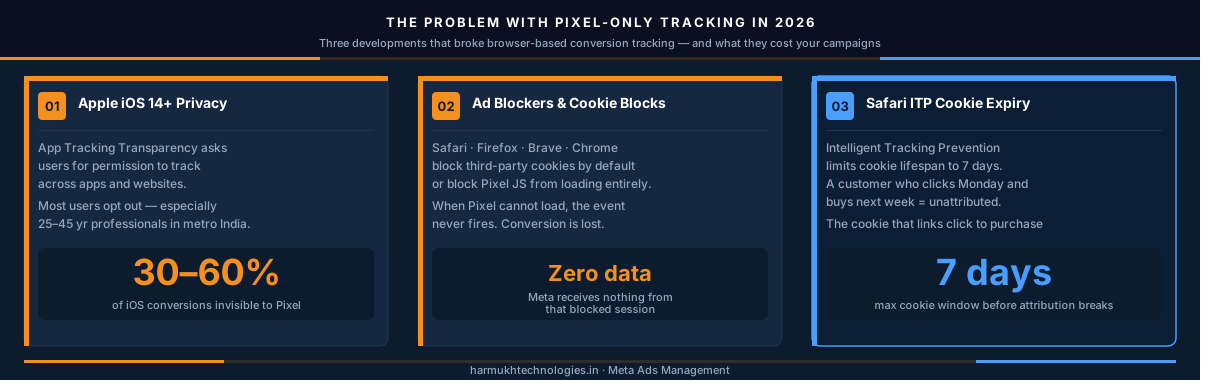
Three developments have fundamentally broken Pixel-only tracking:
1. Apple’s iOS 14+ Privacy Framework
In 2021, Apple introduced App Tracking Transparency — the framework that requires every app on iOS to ask users for permission before tracking them across other apps and websites. The result: a significant portion of iPhone and iPad users opted out of tracking entirely.
When an iOS user opts out, the Meta Pixel cannot identify them, cannot record their conversion, and cannot attribute their purchase back to the ad that drove it. Depending on the proportion of iOS users in your audience, this can mean 30 to 60% of your conversions are invisible to the Pixel.
In India, iOS device penetration varies by city and demographic — but in the premium urban segments that most businesses are targeting, iPhone usage is significant and growing. If your target customer is a 25 to 45 year old professional in a metro city, a large fraction of them are on iOS and opting out of tracking.
2. Browser-Level Ad Blockers and Cookie Restrictions
Modern browsers — Safari, Firefox, Brave, and increasingly Chrome — either block third-party cookies by default or give users easy tools to do so. Ad blockers, which are now used by a significant proportion of desktop internet users, block the Meta Pixel from loading entirely.
When the Pixel cannot load, the conversion event never fires. Meta sees no data from that session. The conversion is lost.
3. Safari’s Intelligent Tracking Prevention (ITP)
Safari’s ITP system limits the lifespan of cookies to seven days for most cases and one day for some cross-site scenarios. This means a customer who clicks your ad on a Monday and completes a purchase the following week may not be attributable to that ad — because the cookie that would have made the connection has expired.
⚠️ What this means for your current Meta Ads data
If you are running Meta Ads with Pixel-only tracking in 2026, your conversion data is likely understated by anywhere from 20% to 60% depending on your audience’s device composition and browser behaviour. The CPL and ROAS numbers in your dashboard look better than the situation on the ground — because you are counting the conversions you can see, not the conversions that actually happened. This means your campaigns may be performing much better than reported — and you are underinvesting in channels and creatives that are actually working. Or they may be underperforming, and you cannot tell because the measurement is broken.
This is precisely why running ads without proper conversion tracking is one of the most expensive mistakes a business can make in 2026 — and why the Conversions API exists.
What Is the Conversions API — and How Is It Different?
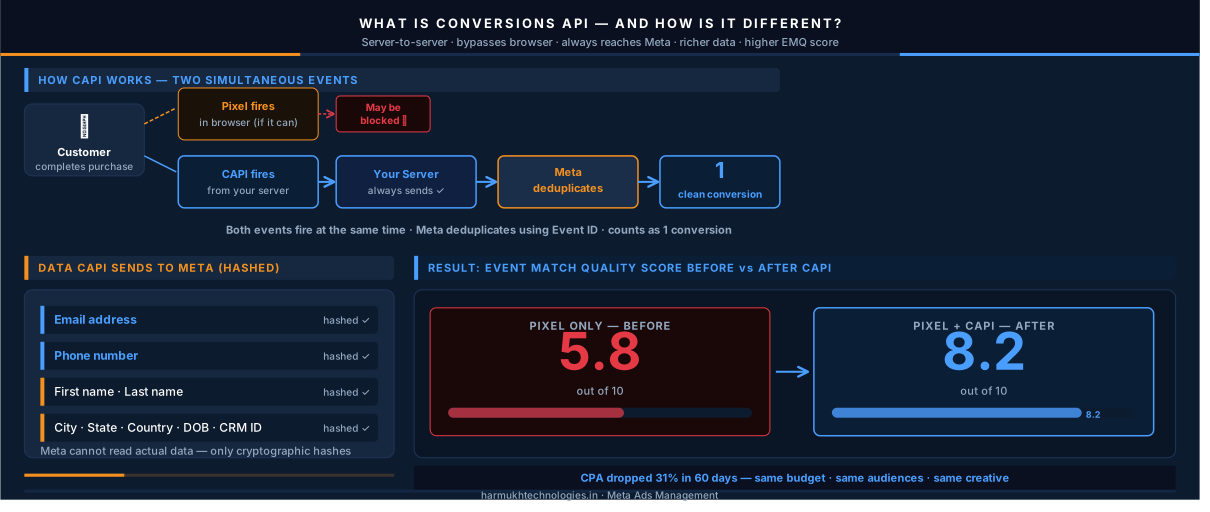
The Meta Conversions API (CAPI) is a server-to-server connection that sends conversion data directly from your website’s server to Meta — completely bypassing the browser.
Here is the critical distinction: the Pixel sends data from the visitor’s browser to Meta. CAPI sends data from your server to Meta. The visitor’s browser settings, ad blockers, iOS privacy restrictions, and cookie lifespans are completely irrelevant to a server-side signal. When a purchase happens on your server, your server tells Meta’s server — and no browser-level restriction can interrupt that conversation.
How CAPI works in practice:
When a customer completes a purchase on your website, two things happen simultaneously:
- The Meta Pixel fires in the browser — if it can. If the customer is on iOS with tracking opted out, or if they have an ad blocker, this event may not reach Meta.
- Your server sends the same purchase event directly to Meta via the Conversions API — regardless of what is happening in the browser. This event always reaches Meta.
Meta then deduplicates the two signals — if both the Pixel and CAPI fire for the same conversion, Meta counts it as one event, not two. The result is more complete conversion data without double-counting.
What data CAPI sends to Meta:
CAPI can send the same standard events the Pixel tracks — Purchase, Lead, View Content — but it can also include richer customer data that helps Meta improve event matching accuracy:
- Email address (hashed)
- Phone number (hashed)
- First name, last name
- City, state, country
- Date of birth
- External ID from your CRM
This customer data is sent in hashed format — Meta cannot read the actual email address, only a cryptographic version of it. But this hash allows Meta to match the conversion to a specific Facebook or Instagram user with significantly higher accuracy than browser-based matching alone.
The result of this richer matching is a higher Event Match Quality (EMQ) score — Meta’s measure of how reliably it can connect your conversion events to actual users. A higher EMQ score means better audience modelling, better lookalike audiences, and better campaign optimisation.
Meta Pixel vs Conversions API — Side by Side
| Factor | Meta Pixel | Conversions API (CAPI) |
|---|---|---|
| Where it runs | Visitor’s browser | Your web server |
| Affected by iOS 14+ | Yes — significantly | No — server-side bypass |
| Blocked by ad blockers | Yes | No |
| Affected by Safari ITP | Yes — cookie expires in 7 days | No cookie dependency |
| Customer data sent | Browser cookies only | Email, phone, name (all hashed) |
| Event Match Quality | Lower — browser matching only | Higher — customer data matching |
| Setup complexity | Simple — paste code or use GTM | Technical — requires server or GTM setup |
| Can it work alone? | Partially — misses iOS/blocked users | Partially — misses real-time browser events |
The table makes the case clearly: neither tool is complete on its own. The Pixel handles the browser-based, real-time events that CAPI can sometimes miss. CAPI handles the server-side, privacy-resistant signals that the Pixel cannot capture. Together they cover the full picture.
Why You Need Both Running at the Same Time
The question we hear most often after explaining the difference is: “Can’t I just switch to CAPI and skip the Pixel entirely?”
The answer is no and here is why.
The Meta Pixel captures browser-based events in real time, including upper-funnel events like View Content and Add To Cart that are difficult to track server-side because they happen before any transaction is completed. The Pixel also provides real-time event signals that feed into Meta’s dynamic retargeting systems — the ones that show someone the exact product they viewed on your site when they return to their Instagram feed.
CAPI, on the other hand, is most reliable for lower-funnel events — particularly Purchase and Lead — where there is a clear server-side trigger. It fills the gaps the Pixel leaves when users have iOS privacy restrictions or ad blockers active.
Running both in parallel creates what Meta calls a redundant event signal — two independent data sources describing the same conversion, which Meta deduplicates into one clean event. This redundancy is what produces the highest Event Match Quality scores and the most complete conversion data.
What the data shows when you run both
In accounts we have migrated from Pixel-only to Pixel + CAPI, the consistent pattern is a 20 to 40% increase in reported conversions — not because more conversions are happening, but because the ones that were always happening are now being captured. This matters because Meta’s algorithm uses that conversion data to optimise delivery. More signal = better optimisation = lower CPA over time.
One e-commerce client we manage saw their Event Match Quality score increase from 5.8 to 8.2 (out of 10) after CAPI was implemented alongside the existing Pixel. Within 60 days, their cost-per-purchase dropped by 31% — on the same budget, targeting the same audiences, with the same creative. The only change was the tracking infrastructure.
This directly connects to the broader point we make in our guide to understanding CPL, CPA, and ROAS — your metrics are only as reliable as your tracking infrastructure. A low CPL built on incomplete Pixel data is not a signal of campaign efficiency. It is a measurement gap dressed up as a performance number.
The Deduplication Problem Nobody Talks About
When you run both the Pixel and CAPI simultaneously, both can fire for the same conversion event. Without deduplication, Meta would count that as two conversions — which inflates your reported numbers and corrupts the algorithm’s learning signal.
Meta has a built-in deduplication system, but it requires you to configure it correctly. The mechanism works through a shared Event ID — a unique identifier that you pass to both the Pixel event and the CAPI event at the moment of conversion. When Meta sees two events with the same Event ID, it knows they describe the same conversion and counts only one.
This sounds straightforward, but it is where most partial CAPI implementations break down. Common deduplication mistakes include:
- Not passing an Event ID at all — Meta cannot deduplicate without it. Both events are counted, conversions are inflated, and the algorithm learns from a distorted signal
- Passing different Event IDs for the same conversion — the Pixel and CAPI events look like separate conversions to Meta, even though they describe the same purchase
- Inconsistent Event Name formatting — if the Pixel fires a “Purchase” event but CAPI sends a “purchase” event with a lowercase p, Meta may not recognise them as the same event type
- Timing mismatches — if the Pixel fires immediately at checkout completion but CAPI fires three hours later due to a delayed server webhook, the events may fall outside Meta’s deduplication window
Correct deduplication is one of the most technically nuanced parts of a proper Meta tracking setup — which is one of the reasons we include Pixel and CAPI setup with deduplication verification as a mandatory first step in every Meta Ads Management engagement at Harmukh. No campaign launches until Events Manager confirms clean, deduplicated events firing at the correct match quality score.
How to Set Up Meta Pixel and CAPI Correctly
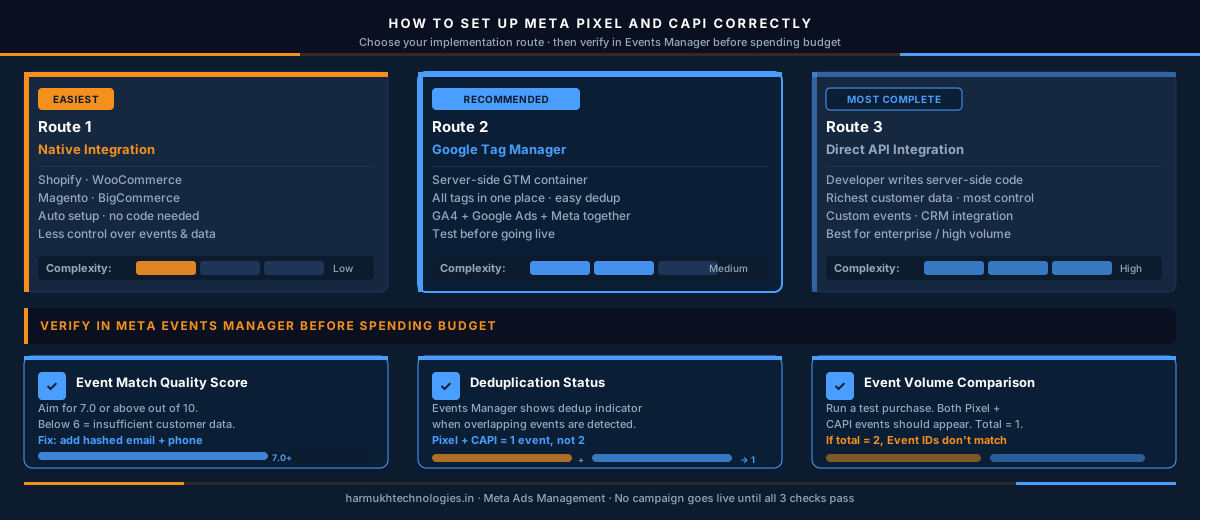
There are three main implementation routes for CAPI, each with different complexity and reliability profiles.
Route 1: Meta’s Native Integrations (Easiest)
Meta offers native CAPI integrations for major e-commerce platforms Shopify, WooCommerce, Magento, and BigCommerce. These integrations handle the server-side event sending automatically once you connect your store to your Meta Business account.
The advantage is simplicity — no custom code required. The limitation is that native integrations give you less control over exactly which events are sent, what customer data is included, and how deduplication is handled. For most small e-commerce businesses, the native integration is a reasonable starting point.
Route 2: Google Tag Manager (Recommended for Most Businesses)
GTM-based CAPI implementation uses Meta’s server-side GTM template to send conversion events from your GTM server container rather than from your website’s own server. This is our recommended approach for most businesses because it:
- Does not require direct access to your website’s server code
- Keeps all your tracking tags in one managed environment alongside your GA4 events and Google Ads tags
- Makes deduplication straightforward through GTM’s built-in variable system
- Allows testing and verification before going live
Our complete GTM conversion tracking guide covers the full setup process for deploying the Meta Pixel through GTM — the same container handles both the Pixel base code and the event tags, making this the most efficient single-container approach for businesses running both Meta Ads and Google Ads.
Route 3: Direct API Integration (Most Complete)
Direct server-side integration sends CAPI events from your own server using Meta’s Marketing API. A developer writes server-side code that fires when specific conversion events occur — purchase completion, form submission, booking confirmation — and sends them directly to Meta’s API endpoint.
This approach gives you the most control and the highest event match quality because you can pass the richest customer data set directly from your database. It is the right choice for businesses with dedicated development resources, high transaction volumes, or complex conversion events that require custom logic.
Verifying your setup in Meta Events Manager:
After implementation, open Meta Events Manager and check three things before spending any budget:
✓ Event Match Quality Score
Aim for 7.0 or above out of 10. Scores below 6 indicate insufficient customer data is being passed. Improve by adding hashed email and phone to your CAPI events.
✓ Deduplication Status
Events Manager shows a deduplication indicator when it detects overlapping events. Confirm that Pixel and CAPI events for the same conversion are being collapsed into a single event count.
✓ Event Volume Comparison
Run a test purchase and confirm that both the Pixel and CAPI events appear in Events Manager — and that the total event count shows one conversion, not two. If you see two events without deduplication, your Event IDs are not matching correctly.
How Better Tracking Directly Improves Your Ad Performance
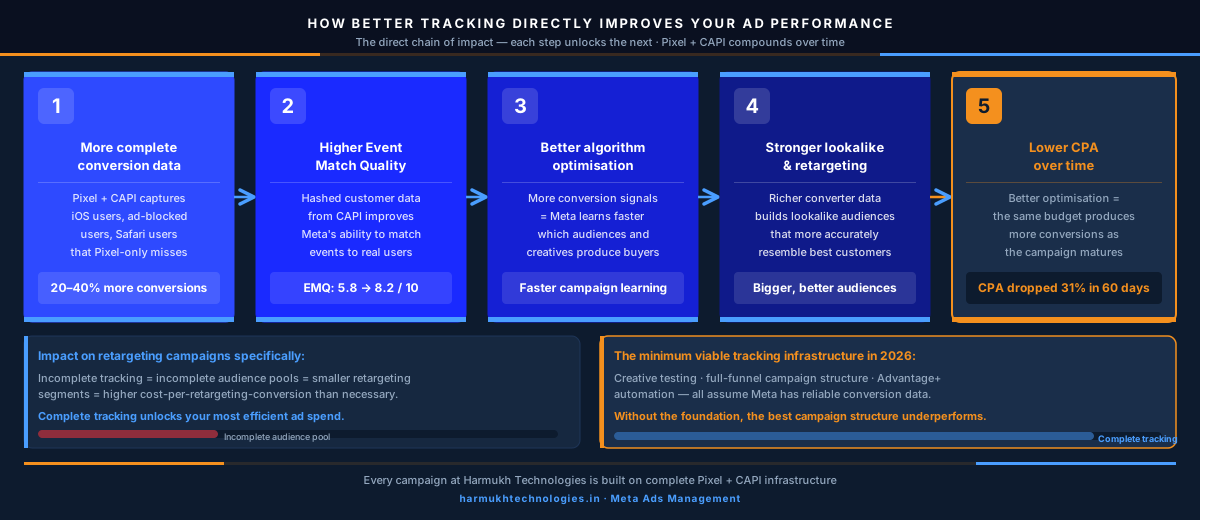
The connection between tracking quality and campaign performance is not theoretical. Meta’s algorithm is a machine learning system — it learns from the conversion signals you provide, and the quality of those signals directly determines how well it can optimise your campaigns.
Here is the direct chain of impact:
This is the foundation of how performance marketing at Harmukh is built every campaign is only as good as the data it runs on. Pixel and CAPI together are not a nice-to-have setup. They are the minimum viable tracking infrastructure for any Meta Ads account that is serious about performance in 2026.
The same principle applies across your paid advertising stack. If you are running Google Ads alongside Meta Ads, understanding how both platforms use conversion signals connects directly to why performance marketing needs expert oversight — the tracking infrastructure that makes campaigns compound over time is the hardest part to build correctly and the most consequential part to get wrong.
The impact on your retargeting campaigns specifically:
If you are running Meta remarketing campaigns, the quality of your Pixel and CAPI setup directly determines the size and quality of your retargeting audiences. Incomplete tracking means incomplete audience pools which means your highest-intent retargeting segments are smaller than they should be, your cost-per-retargeting-conversion is higher than it needs to be, and the most efficient part of your Meta ad spend is being artificially constrained by a tracking gap you may not know exists.
Complete tracking Pixel plus CAPI, correctly deduplicated, with a high Event Match Quality score is the infrastructure that makes every other Meta advertising strategy work better. Creative testing, full-funnel campaign structure, Advantage+ automation all of these are built on the assumption that Meta has reliable conversion data to learn from. Without that foundation, the most sophisticated campaign structure in the world will underperform.
The Bottom Line
Meta Pixel and Conversions API are not competing tools they are complementary ones. The Pixel works in the browser and captures real-time, upper-funnel events. CAPI works on the server and captures conversion events that iOS restrictions, ad blockers, and cookie limitations would otherwise make invisible to your campaigns.
Running both in parallel, with correct deduplication and a high Event Match Quality score, is the tracking foundation that every Meta Ads campaign in 2026 should be built on. It is not a technical nicety. It is the difference between a campaign that compounds over time and one that wastes budget optimising toward incomplete data.
If you are unsure whether your current Pixel and CAPI setup is configured correctly or if you have never set up CAPI at all that is exactly the conversation we start with every new
Meta Ads client at Harmukh Technologies. We audit your Events Manager, verify deduplication, check your Event Match Quality score, and fix what is broken before a single rupee of campaign budget is spent.
Free Tracking Audit
Not Sure If Your Meta Pixel and CAPI Are Set Up Correctly?
We audit your Events Manager, verify deduplication, check Event Match Quality, and tell you exactly what is working and what is not — before you spend another rupee.