
If you’ve ever typed a question into ChatGPT, Claude, or Gemini, you’ve already prompted an AI — whether you realized it or not. But there’s a real difference between typing something and typing something that actually gets you the result you want. This guide breaks down what prompting is, what makes a good one, and how prompting works across different AI tools. (If you’re also curious how AI-driven search itself works, see our guide on What Is AEO? Answer Engine Optimisation Explained.
Quick Summary: Prompting is giving an AI model an instruction to get a response — anyone typing into ChatGPT, Claude, or Gemini is already doing it. The quality of that instruction (clarity, context, specificity, structure) directly determines the quality of the output, and this holds true across every major AI tool, even though each responds slightly differently. Prompt engineering is the more deliberate, iterative version of this skill — designing and refining prompts for reliable, repeatable results, often at scale.
Jump to a section:
- What Is Prompting?
- What Is a Prompt?
- How Does Prompting Work?
- What Is Prompting in ChatGPT?
- Prompting in Claude, Gemini, and Other AI Tools
- What Makes a Good Prompt?
- What Is an Example of Prompting?
- Prompt Templates You Can Copy and Use
- Quick Tips for Effective Prompting
- Prompting vs. Prompt Engineering
- Prompting for Marketers
- Prompt Engineering Tools (Further Reading)
- FAQ
What Is Prompting?
Prompting is the act of giving an AI model an instruction, question, or piece of input so it can generate a response. It’s simply how humans communicate with AI language models — the input side of every AI interaction, from a one-line question to a detailed set of instructions.
Every time you type into an AI chatbot, you’re prompting it. The words you choose, the context you provide, and the format you request all shape the output you get back. Change the prompt, and the result changes with it — that relationship, input shapes output, is the entire foundation of prompting.
Prompting is also worth defining by what it’s not. It isn’t the same as searching — a search engine matches keywords to existing pages, while a prompt gives an AI model enough context to generate something new. It isn’t programming — no code or technical syntax is required, just clear natural language. And it isn’t a one-word command — effective prompts are usually full sentences carrying real context, not short trigger phrases.
What Is a Prompt?
A prompt is the actual input itself — the specific text (or image, audio, or other data) you submit to an AI model. Prompting is the broader activity of writing, sending, and refining prompts to get useful output.
Think of it like this: a prompt is a single message; prompting is the ongoing conversation. Most prompts today are text, but prompts can take other forms too:
Text prompts— written instructions or questions, the most common type across ChatGPT, Claude, and Gemini
Image prompts— an image used as input, either to be analyzed or as a style reference for image generation
Audio prompts— spoken input used by voice assistants or audio-processing models
Whatever form it takes, a prompt’s job is the same: give the model enough information to produce a relevant, useful result.
How Does Prompting Work?
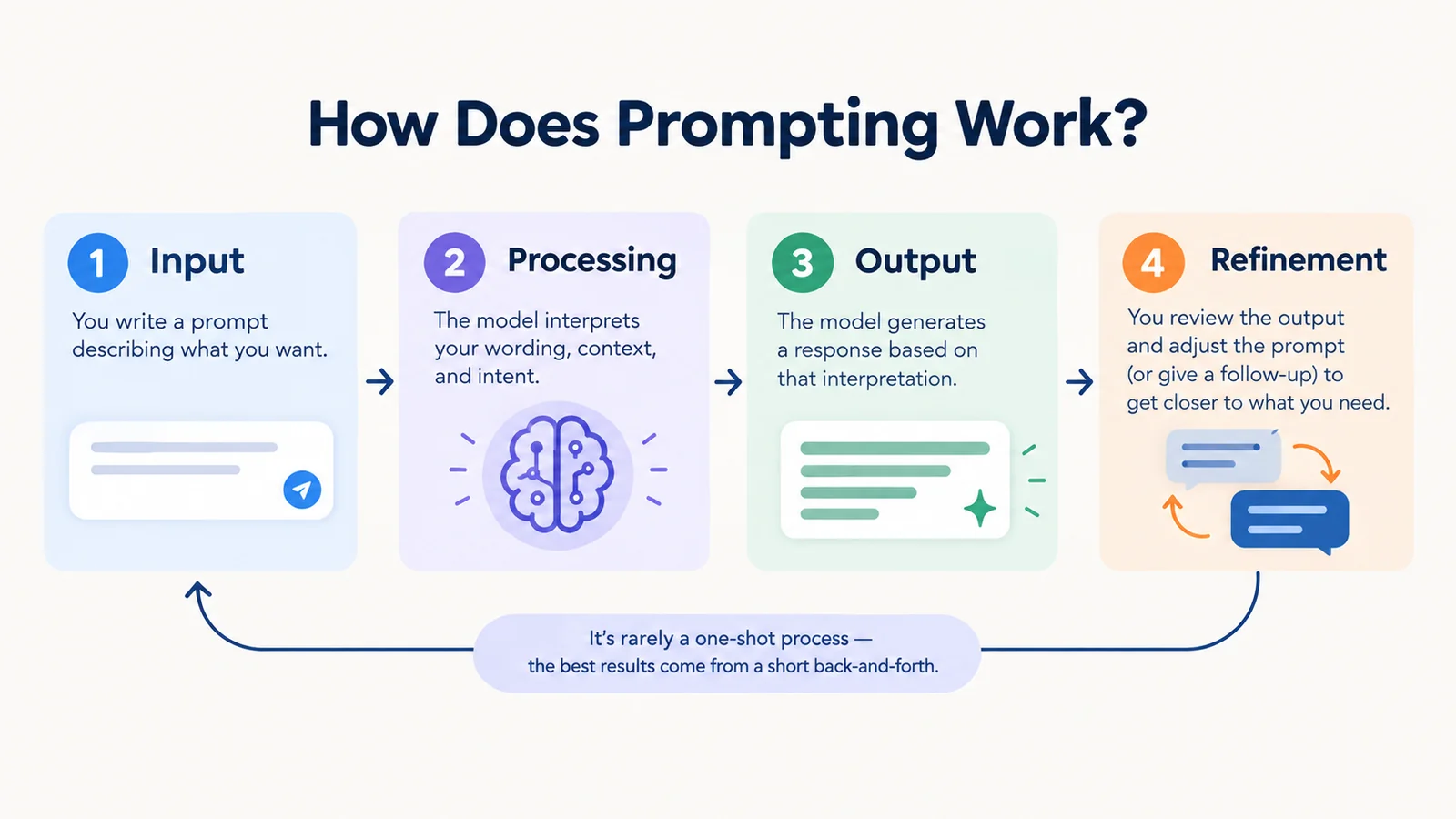
AI models are trained to predict and generate content based on patterns learned from massive datasets. When you submit a prompt, the model interprets your wording, context, and intent, then generates a response designed to match what it infers you’re asking for. In practice, this plays out as a loop:
- Input— you write a prompt describing what you want
- Processing— the model interprets your wording and any context provided
- Output— the model generates a response based on that interpretation
- Refinement — you review the output and adjust the prompt (or give a follow-up instruction) to get closer to what you actually need
That fourth step matters more than people expect. Prompting is rarely a one-shot transaction — the best results usually come from a short back-and-forth, not a single perfect prompt written on the first try.
A few things influence how well a prompt performs at every stage of that loop:
- Clarity — vague prompts produce vague answers
- Context — background information helps the model understand the situation
- Specificity — details about length, tone, format, or audience narrow the output
- Structure — step-by-step instructions or examples guide more complex tasks
This holds true across virtually every major AI tool, though each one interprets and weighs these signals slightly differently.
What Is Prompting in ChatGPT?
Prompting in ChatGPT means typing an instruction, question, or piece of text that tells the model what you want it to generate. ChatGPT responds strongly to specificity — a vague prompt gives it room to guess, while a detailed prompt gives it a clear target.
Basic prompt:
Explain machine learning.
More effective prompt:
Explain machine learning in simple, layman’s terms, as if I have no technical background. Use a real-world analogy and keep it under 150 words.
The second version tells ChatGPT exactly who the audience is, what tone to use, and how long the response should be — which is why prompts like “explain in simple layman’s terms” consistently produce clearer, more usable answers than open-ended requests.

Prompting in Claude, Gemini, and Other AI Tools
The same fundamental principles — clear task, context, constraints, and desired output — apply across every major AI assistant. What differs is how each interface and model tends to respond, based on their documentation and typical behavior, rather than any strict requirement:
- Claude is well documented as responding favorably to structured input — numbered steps, labeled sections, or specific pieces of content wrapped in clear tags — though plain, clear instructions still work well too.
- Gemini tends to handle conversational, multi-turn prompting comfortably, and integrates naturally with prompts that reference Google Workspace content like Docs, Sheets, or Gmail.
- Microsoft Copilot is generally most effective with task-oriented prompts, particularly inside Microsoft 365 apps like Word, Excel, and Outlook.
- Perplexity is built around research-style prompting, performing best when prompts ask for sourced, up-to-date answers rather than open-ended creative text.

Basic prompt (works across any of these tools):
Write a product description for a water bottle.
More effective prompt:
Write a 100-word product description for a stainless steel water bottle. Audience: outdoor/fitness shoppers. Tone: energetic but not overhyped. Highlight insulation and durability.
Different models will often produce different output from the exact same prompt, since each has its own training and response style — but the underlying strategy for writing a good prompt barely changes between them.
Trying to decide which model to use for a specific marketing task, rather than just how to prompt one? Our prompt engineering for marketers guide covers which model to pick for ad copy, campaign strategy, and reporting.
Most well-structured prompts, regardless of task, are built from the same handful of components. Not every prompt needs all of them, but the more of these you include, the more precisely the model can target your intent:
- Task — the specific thing you want the model to do, stated plainly (“write,” “summarize,” “compare,” “generate”)
- Context — background information the model needs to understand the situation (audience, purpose, prior details)
- Role — a persona or expertise level you want the model to adopt (“act as a copywriter,” “act as a data analyst”)
- Format — how the output should be structured (length, tone, list vs. paragraph, headings)
- Constraints — what to avoid or limit (word count, excluded topics, banned phrases)
- Examples — a sample of the kind of output you want, when the format is hard to describe in words alone
A basic prompt might only include a task and a little context. A stronger, more comprehensive prompt layers in role, format, and constraints on top — and that’s usually the difference between a generic AI response and one that’s genuinely usable without heavy editing.

Want the complete, structured version of this — a formal framework with copy-paste templates built for a whole team? Our Prompt Engineering for Marketers guide covers exactly that.
What Is an Example of Prompting?
Prompting looks a little different depending on the task, but the same basic pattern — vague vs. specific — holds across all of them.
Writing:
- Basic: “Write a blog post about SEO.”
- Specific: “Write a 1,500-word beginner-friendly blog post about technical SEO. Explain crawling, indexing, and Core Web Vitals using practical examples. Use clear H2 headings and avoid jargon.”
Research:
- Basic: “Tell me about renewable energy.”
- Specific: “Summarize the three most significant renewable energy policy changes in the EU over the past 12 months, with a one-sentence takeaway for each.”
Marketing:
- Basic: “Write an ad for my skincare brand.”
- Specific: “Write 3 Meta ad headlines (max 40 characters each) for a skincare brand targeting women aged 25–35 who are concerned about hyperpigmentation. Tone: reassuring, not clinical.”
Image generation:
- Basic: “A city at night.”
- Specific: “A highly detailed illustration of a futuristic cityscape at night, with hovering vehicles and neon lights, in a cyberpunk style.”
In every case, the specific version defines the topic, audience, format, and constraints — which is why it produces a far more predictable, usable result than the basic version.
Prompt Templates You Can Copy and Use
Here’s the ingredients from “What Makes a Good Prompt?” turned into ready-to-use formulas. Just fill in the brackets with your specific situation.
1. Explain something simply
Explain [topic] in simple terms, as if I have no background in it. Use a real-world analogy and keep it under [X] words.
Example: “Explain blockchain in simple terms, as if I have no background in it. Use a real-world analogy and keep it under 100 words.”
2. Summarize something
Summarize [article/document/text] in [X] bullet points, focusing on [specific aspect]. Skip anything not directly relevant to that.
Example: “Summarize this earnings call transcript in 5 bullet points, focusing on revenue growth. Skip anything about leadership changes.”
3. Compare options
Compare [option A] and [option B] for someone who needs [specific goal]. Present it as a short table with the key trade-offs.
Example: “Compare a standing desk and a regular desk for someone who works from home and has lower back pain. Present it as a short table with the key trade-offs.”
4. Brainstorm ideas
Give me [X] ideas for [goal], aimed at [audience]. Keep each one to one sentence, and avoid anything generic or overused.
Example: “Give me 10 ideas for a team-building activity, aimed at a fully remote team of 8. Keep each one to one sentence, and avoid anything generic or overused.”
5. Draft something
Write a [type of content] about [topic] for [audience]. Tone: [tone]. Length: [length]. Include [specific requirement].
Example: “Write a short LinkedIn post about switching careers into tech, for people in their 30s. Tone: honest, not overly motivational. Length: under 150 words. Include one specific lesson learned.”
Notice each template maps back to the same ingredients — task, context or audience, format, and a constraint or two. Swap in your own details and you’ve got a working prompt in seconds. For templates built specifically around marketing tasks — ad copy, campaign summaries, email sequences — see the Prompt Engineering for Marketers guide.
Quick Tips for Effective Prompting
A few habits make the biggest difference once you’ve got the basics down:
- Front-load your context. Give the AI the background it needs before asking the question, rather than expecting it to guess your situation.
- Say what to avoid, not just what to include. “No jargon,” “skip the intro,” or “don’t use bullet points” are just as useful as positive instructions.
- Break big tasks into smaller steps. Asking for a full marketing plan in one shot produces a scattered result; asking for the audience, then the channels, then the calendar, produces a sharper one.
- Don’t expect perfection on the first try. Treat the first response as a draft, and refine it with a quick follow-up (“make this shorter,” “more casual tone”) rather than starting over.
- Give an example when the format is hard to describe. Showing the AI what “good” looks like is often faster than explaining it in words.
- Review before you use it. AI output can sound confident and still be wrong — fact-check names, numbers, and claims before publishing or sending anything generated.
Prompting vs. Prompt Engineering
Prompting is the everyday act of giving an AI instructions — something anyone can do, with or without technical knowledge.
Prompt engineering is the more deliberate practice of designing, testing, and refining prompts to produce more reliable, accurate, or consistent results — often for repeated or complex use cases like coding, data extraction, or building AI-powered applications.
Think of it this way: prompting is asking a question. Prompt engineering is designing the best possible version of that question, often through iteration, testing, and structured techniques like few-shot examples, role assignment, or chain-of-thought instructions.
Most people only need good prompting skills. Prompt engineering becomes valuable when you’re building repeatable workflows, AI-powered products, or need highly consistent outputs at scale — which is exactly the territory our Prompt Engineering for Marketers: The Complete 2026 Guide covers in depth, including a 5-part prompt framework and copy-paste templates for Google Ads, Meta, email, and SEO.
Prompting for Marketers
Marketers run into the shift from prompting to prompt engineering constantly. Everyday prompting is enough for a quick task — generating content ideas, summarizing a competitor’s landing page, drafting a first pass at ad copy. But getting consistent, on-brand output across a whole team, campaign after campaign, usually calls for a more deliberate, reusable framework rather than rewriting prompts from scratch each time.
Common day-to-day uses include generating content and campaign ideas, analyzing campaign data and performance summaries, drafting ad copy variations, summarizing market or competitor research, and refining messaging for different audience segments. For a complete, ready-to-use system built specifically for these tasks, see our Prompt Engineering for Marketers: The Complete 2026 Guide.
Prompt Engineering Tools (Further Reading)
Once you’re managing prompts across a team or running the same prompt repeatedly in production, a category of dedicated tools can help — things like native model playgrounds (OpenAI Playground, Anthropic Console, Google AI Studio), testing frameworks like Promptfoo, and observability platforms like LangSmith or PromptLayer. If you’re prompting casually, you won’t need any of these — solid fundamentals cover most day-to-day use. For the broader AI tools landscape, including tools for SEO research and content generation, see our Complete Guide to AI SEO Tools in 2026.
FAQ
What is prompting in ChatGPT?
Prompting in ChatGPT means typing an instruction, question, or piece of text that tells the model what you want it to generate. ChatGPT reads the prompt, interprets your intent, and produces a response based on it — the more specific the prompt, the more targeted the response.
What is an example of prompting?
A simple example is asking an AI, “Write a blog post about SEO,” versus a more specific version like, “Write a 1,500-word beginner-friendly blog post about technical SEO covering crawling, indexing, and Core Web Vitals.” The second version demonstrates prompting with clear intent, structure, and constraints.
What is the difference between prompting and prompt engineering?
Prompting is simply giving an AI an instruction to get a response. Prompt engineering is the more deliberate, iterative process of designing and refining prompts — often using specific techniques and testing — to produce more accurate, consistent, or reliable results, especially for complex or repeated tasks.
Ready to Put This Into Practice?
You now know what prompting is and how to do it well — the next step is turning that into a repeatable system for your actual work. Our Prompt Engineering for Marketers: The Complete 2026 Guide walks through a complete 5-part prompt framework plus ready-to-use templates for Google Ads, Meta, email, and SEO content — so you’re not rewriting prompts from scratch every time.