
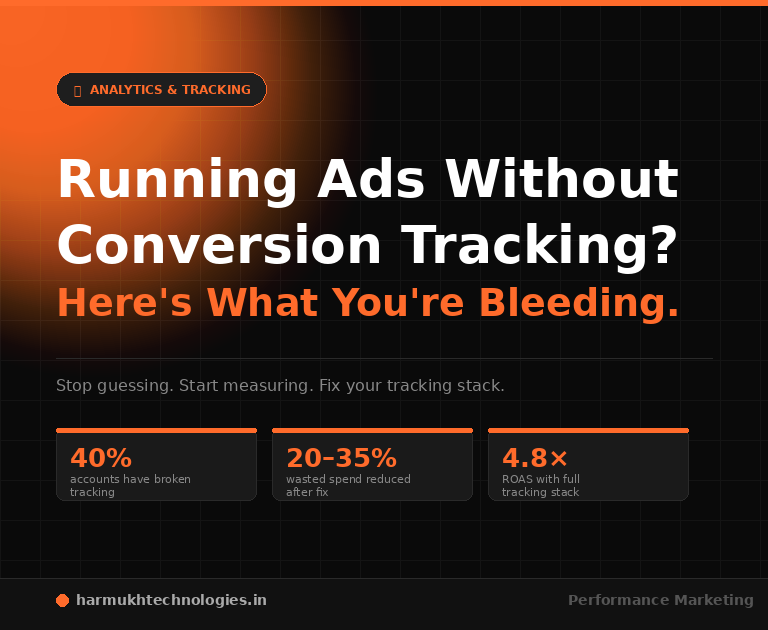
Running paid ads without conversion tracking isn’t just a measurement gap it’s a systematic way to overspend, misattribute, and optimise toward the wrong outcomes. Every rupee you spend without tracking is a bet you can’t verify, a bid you can’t improve, and a result you can’t attribute. Here’s exactly what you’re missing and what it costs.
Most advertisers think of conversion tracking as a reporting feature something that shows you how many people bought, filled the form, or called. That framing gets the whole thing wrong. Conversion tracking is not a reporting layer sitting on top of your campaigns. It is the signal that your campaigns run on.
When someone clicks your Google Ad and completes a purchase, that action fires a conversion event. Google’s algorithm reads that event and learns: this keyword, this audience, this device, this time of day, this creative — it led to a conversion. Now it adjusts future bids to find more users who look like that. This process runs thousands of times per day across every campaign in your account. Without that conversion event firing, the algorithm has nothing to learn from. It is running on noise.
The same principle applies to Meta Ads. The Meta Pixel and Conversions API track which users completed which actions purchase, lead, add-to-cart, view-content. This data feeds Meta’s Advantage+ targeting, lookalike audience modelling, and creative delivery optimisation. Strip that signal out and Meta is guessing at who to show your ads to. Expensive guessing.
Conversion tracking is, in short, the data infrastructure your entire paid media operation depends on. Running ads without it is not a suboptimal strategy it is the absence of strategy.
- What Conversion Tracking Actually Measures
- The 5 Things You Lose Without It
- Why Your Bidding Strategy Can’t Work Without It
- How FAN Methodology Treats Tracking as Infrastructure
- The Real Cost of Blind Ad Spend
- How to Fix It: The Tracking Stack You Actually Need
- Frequently Asked Questions

What Conversion Tracking Actually Measures
Smart bidding strategies Target CPA, Target ROAS, Maximise Conversions are pattern-recognition systems. They learn from the conversion signals you give them. Feed them accurate data and they optimise effectively. Feed them nothing or inaccurate data and they optimise toward a distorted signal, producing results that look like strategy failure but are actually tracking failure.
In Harmukh Technologies client account audits, conversion tracking errors are the most common cause of unexplained smart bidding underperformance. Duplicate conversion tags are found in approximately 40% of accounts that have never had a formal GTM audit. The most common symptom: at CPA campaign with a reported CPA of ₹200 that after deduplication is actually ₹400. The algorithm has been bidding aggressively for conversions it believes cost half of what they actually cost. Fixing the tracking alone, without changing any other campaign setting, typically reduces wasted spend by 20–35% within the first month.
The 5 Things You Lose Without Conversion Tracking
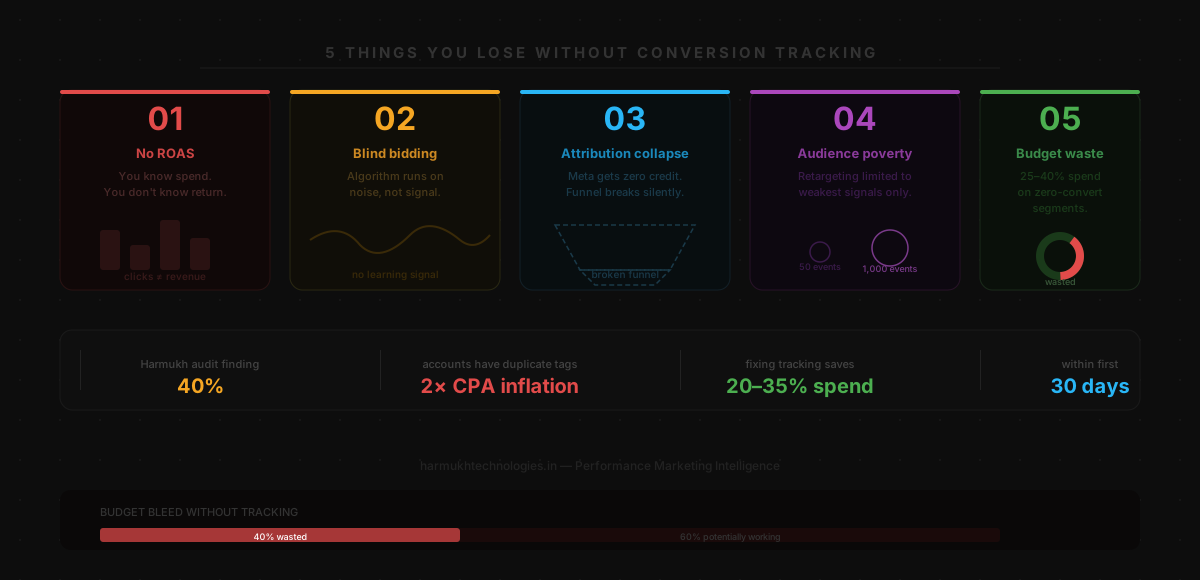 1. You Cannot Measure Return on Ad Spend
ROAS is the primary performance metric for any paid media campaign with a revenue objective. Without conversion tracking that captures actual transaction values, you do not have ROAS you have spend. You know how much you paid. You do not know what it produced. Reporting click-through rate, impression share, or cost-per-click to a business owner who wants to know if their ad budget is working is noise dressed as insight.
At Harmukh Technologies, we built KashmirTickets.com from zero to ₹1.5 crore in revenue in Year 1 achieving 4.8× ROAS on Google Ads. That result was only possible because every rupee spent was attributed to actual revenue through a correctly configured conversion tracking stack. Without it, we would have had a report showing clicks and impressions, not a number that tells a business whether their investment worked.
2. Smart Bidding Has No Signal to Optimise On
Every modern bidding strategy tCPA, tROAS, Maximise Conversions requires conversion data to function. The algorithm needs a minimum of 30 verified conversions per month before it can make statistically reliable bidding decisions. Without that data, Google defaults to optimising for clicks, which costs money but does not distinguish between a user who bounces in three seconds and a user who becomes a paying customer.
The practical consequence: accounts without conversion tracking are almost always overpaying for traffic that does not convert, and underpaying for traffic that would. Manual CPC bidding can mitigate this to a degree, but at scale, human intuition cannot compete with machine learning running on accurate conversion data. For the full breakdown of how bidding strategies interact with your conversion data, see our Google Ads Bidding Strategies guide.
3. You Cannot Attribute Across Channels
A customer sees your Instagram ad on Monday, searches your brand name on Google on Wednesday, and converts on Friday via a direct visit. Without conversion tracking, that purchase is attributed to the direct visit. Meta gets zero credit. The result: you reduce Meta budget because it “isn’t producing conversions,” which breaks the top-of-funnel awareness that was driving the branded searches in the first place. This attribution collapse is one of the most common ways growing businesses accidentally undermine their own paid media performance.
4. Audience Targeting and Retargeting Is Broken
Your most valuable audience segments are defined by conversion behaviour users who added to cart but did not purchase, users who visited the pricing page, users who completed a lead form. These audiences are only available if your Pixel or tag is tracking those specific events. Without conversion event tracking, your retargeting audiences are limited to basic page visitors — the weakest possible signal for intent-based retargeting.
Lookalike audiences on Meta are built from your conversion event data. The more high-quality conversions Meta has to learn from, the tighter and more accurate the lookalike. An account with 1,000 purchase events builds a dramatically better purchase lookalike than an account with 50 page-visit events. Every week you run without conversion tracking is a week you are not building the data foundation your lookalike audiences depend on.
5. You Cannot Identify and Fix Budget Waste
Without knowing which keywords, placements, audiences, devices, and times of day produce conversions, you cannot make informed decisions about where to reduce spend and where to increase it. The result is campaigns that continue spending equally across all dimensions regardless of performance funding the keywords that never convert at the same rate as the ones that drive your revenue. In audit after audit of accounts without conversion tracking, the same pattern appears: 20–30% of total spend going to segments that have never produced a single conversion.
Why Your Bidding Strategy Cannot Work Without Conversion Data
Smart bidding is not a toggle you switch on and it starts working. It is a machine learning system that requires sufficient, accurate, and relevant conversion signal to make reliable bid decisions. Insufficient signal means the algorithm is operating with statistical uncertainty too wide to produce reliable optimisation.
The bidding implication of tracking inaccuracy is severe. If your actual CPA is ₹400 but your tracking shows ₹200 (because duplicate tags are counting every conversion twice), you set your target CPA at ₹220 which is below what the campaign can actually achieve. The algorithm exhausts budget trying to find conversions at a price that doesn’t exist, burns through the daily budget rapidly on broad-match traffic that produces many tag fires, and the campaign oscillates between over-serving and under-serving. It looks like strategy failure. It is tracking failure.
Here is how each bidding strategy behaves with and without accurate conversion tracking:
- Target CPA (needs 30+ conversions/month): Without tracking data, optimises toward noise. With accurate tracking, learns and improves week by week.
- Target ROAS (needs 50+ conversions/month): Without tracking, bids without any revenue signal. With accurate tracking, aligns bids precisely to actual revenue produced.
- Maximise Conversions: Without tracking, maximises meaningless events. With accurate tracking, maximises real business outcomes.
- Manual CPC: Not data-dependent, but without conversion data you are still guessing at which bids to raise and which to reduce.
For the complete guide to configuring these strategies correctly once your tracking is verified, see our Google Ads Bidding Strategies guide and our Google Ads Search Campaigns Complete Guide.
How FAN Methodology Treats Tracking as Infrastructure
At Harmukh Technologies, every paid media engagement Google Ads, Meta Ads, Performance Marketing is executed under the FAN Methodology. FAN stands for Fan-Out Mapping, Authority-Signal Alignment, and Node Architecture. In the context of paid media, the Node Architecture principle is directly relevant: every touchpoint in your marketing system must be connected, measurable, and contributing to the full-funnel signal.
In practice, this means no campaign goes live at Harmukh Technologies without a verified, deduplicated conversion tracking stack in place. The sequence is always: tracking setup and verification first, campaign structure second, bid strategy activation third and only after 30+ verified conversions have accumulated. This is not caution for its own sake. It is the recognition that launching a campaign before tracking is verified is like opening a business without a cash register: you can sell things, but you cannot tell if you’re making money.
The Google Ads Management and Meta Ads Management services at Harmukh Technologies include full conversion tracking setup as a non-negotiable component of onboarding. GTM container configuration, Google Ads native conversion tags, Meta Pixel with CAPI redundancy, dynamic value passing, and GA4 integration — these are not add-ons. They are the foundation.
Part of Harmukh Technologies Mentorship — Module 3: GTM setup and conversion tracking is taught in Module 3 of our 1-on-1 Digital Marketing Mentorship. Students configure live GTM containers on real client websites during the programme, with mentor review of every tag and trigger configuration before any campaign spend begins.
The Real Cost of Blind Ad Spend
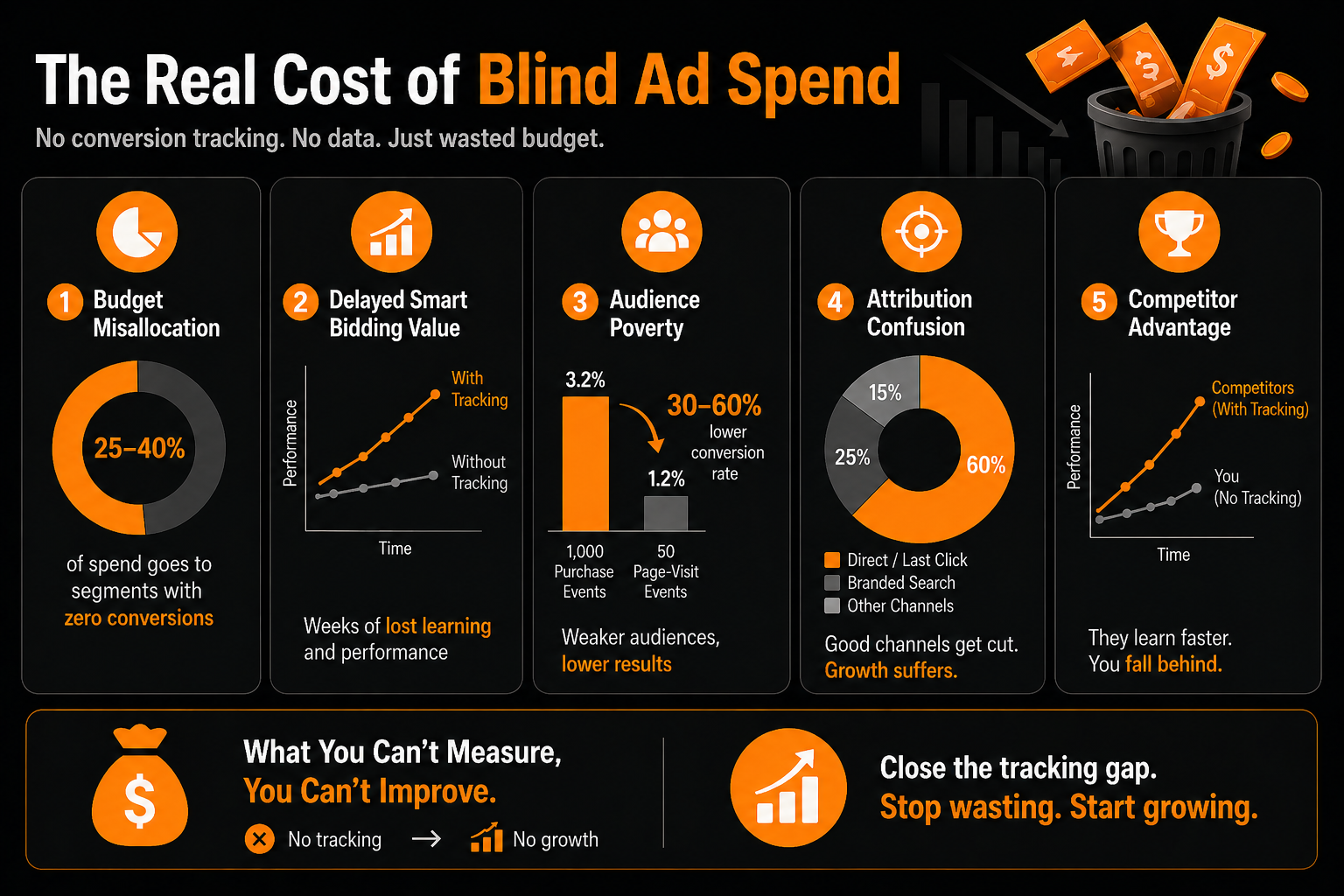
The cost of running ads without conversion tracking is not theoretical. It accumulates in specific, measurable ways:
- Budget misallocation: Without knowing which segments convert, budget distributes equally across performing and non-performing keywords, placements, and audiences. In most untracked accounts, 25–40% of total spend goes to segments with zero conversion history.
- Delayed smart bidding value: Every week without accurate conversion data is a week the algorithm cannot learn. Accounts that fix tracking after 6 months of blind spend often have to restart smart bidding from a cold start losing all accumulated learning history.
- Audience poverty: Retargeting and lookalike audiences built on thin conversion data produce weaker targeting. The gap between a lookalike built on 1,000 verified purchase events versus one built on 50 page-visit events often represents a 30–60% difference in conversion rate for the same ad spend.
- Attribution confusion: When tracking is broken, the attribution model defaults to last-click or direct. Channels doing real awareness work appear to produce no conversions, get cut, and performance drops — but the cause is invisible because the tracking that would explain it was never in place.
- Competitor advantage: Every competitor running properly configured conversion tracking is making better bidding decisions, building better audiences, and improving their algorithm signal faster. The gap compounds over time.
How to Fix It: The Tracking Stack You Actually Need
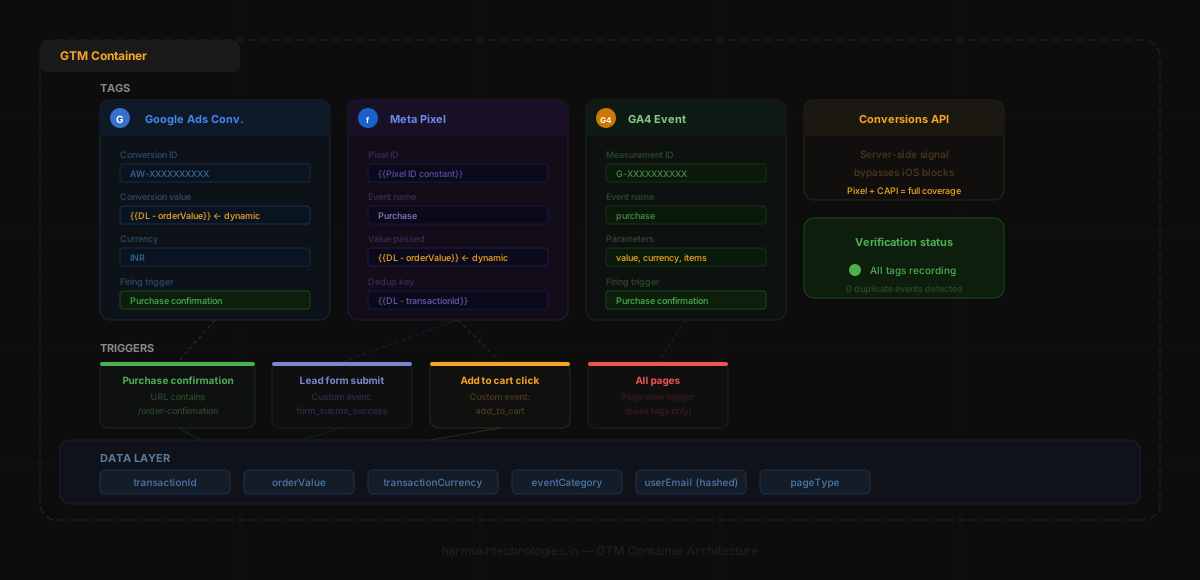
Getting conversion tracking in place is not a months-long project. A properly sequenced setup takes 2–4 days for most businesses. What it requires is doing it in the right order, testing every component before going live, and not cutting corners on dynamic value passing.
Step 1: Set Up Google Tag Manager First
One container, all your tags. GTM is the management layer that makes everything else maintainable. Install the head and body snippets on every page of your website. In WordPress, use a plugin like Insert Headers and Footers. Verify installation with Google Tag Assistant before proceeding to any other step. An incorrectly installed container — missing the body snippet, blocked by cookie consent, or firing twice produces inconsistent data that is worse than no data because it looks plausible while being inaccurate.
Step 2: Create and Configure Google Ads Conversion Actions
Set up Purchase and Lead conversion actions in your Google Ads account with the correct conversion windows 30 days for lead generation, 7–14 days for e-commerce. Deploy the conversion tags through GTM with dynamic value passing mapped to your Data Layer variables. Static conversion values (always ₹500 regardless of actual order size) make tROAS campaigns systematically incorrect the algorithm cannot distinguish between a ₹500 transaction and a ₹5,000 one. Dynamic values are not optional for ROAS campaigns; they are the prerequisite for the strategy to function as designed.
Step 3: Install GA4 Through GTM
GA4 Config tag on All Pages. Purchase and Lead event tags with the same dynamic values. Link your GA4 property to Google Ads. GA4 provides the cross-channel attribution picture that native Google Ads tracking cannot give you it is what tells you that the Meta awareness campaign is feeding the branded Google search conversions.
Step 4: Deploy Meta Pixel Through GTM
Base Code tag on All Pages (DOM Ready trigger). Standard Event tags for ViewContent, AddToCart, InitiateCheckout, Lead, and Purchase each with a specific trigger, each passing dynamic values. Managing the Meta Pixel through GTM keeps all your marketing tags in one versioned environment rather than having direct-code implementations scattered across your website. For markets with significant iOS privacy restrictions or high ad blocker usage, Meta’s Conversions API provides server-side signal redundancy that maintains tracking accuracy when browser-based Pixel events are blocked.
Step 5: Verify End-to-End Before Spending
GTM Preview Mode, GA4 DebugView, Google Ads Tag Assistant, Meta Events Manager check every conversion event fires once, on the correct page, with the correct value. Fix deduplication errors before any campaign budget is activated. Testing takes 30–60 minutes. Fixing a corrupted smart bidding dataset takes 4–6 weeks. Never publish a GTM container to a live site without testing every tag and trigger first.
Step 6: Accumulate Conversions Before Activating Smart Bidding
Run Manual CPC or Maximise Clicks for the first 30 conversions. Only switch to tCPA or tROAS once you have sufficient, verified conversion data for the algorithm to learn from. Activating smart bidding on an account with fewer than 30 conversions is one of the most reliable ways to waste budget the algorithm is making statistical inferences from a dataset too small to be meaningful.
The full technical setup GTM container configuration, tag types, trigger conditions, Data Layer variable mapping, testing protocols, and common deduplication errors is covered step by step in our Google Tag Manager Conversion Tracking: Complete Setup Guide (2026).
The Most Destructive Conversion Tracking Mistakes
Duplicate Conversion Tags
A Google Ads conversion tag deployed through GTM and an old hardcoded Google Ads conversion snippet still present in the website’s source code, both firing on every purchase this is the most damaging GTM mistake. Every conversion is counted twice, halving the reported CPA and causing smart bidding to bid aggressively toward a target it can never achieve. Before deploying any GTM conversion tag, check the website’s source code for existing conversion snippets and remove them. In WordPress, check theme files, plugin settings, and any header/footer injection plugins.
All Pages Trigger on a Conversion Tag
Setting an All Pages trigger on a conversion tag fires the conversion event on every page load meaning every session produces multiple “conversions” before the user has taken any action. The result is an account showing thousands of conversions with a CPA of ₹2–5, which looks excellent until you realise none of the reported conversions represent real business outcomes. Always use a specific URL-based trigger or a Data Layer Custom Event trigger for conversion tags.
Static Conversion Values for tROAS Campaigns
Setting a static conversion value on a Google Ads conversion tag used for a tROAS campaign means the algorithm treats every conversion as equal regardless of revenue. It underbids on ₹5,000 transactions and overbids on ₹200 transactions. Dynamic values, passed through Data Layer Variables, are the prerequisite for tROAS to function correctly not an optional enhancement.
Not Testing After Website Updates
Website updates theme changes, checkout platform migrations, new page builders, URL structure changes — frequently break GTM triggers silently. A URL-based trigger that fired on “/order-confirmation” stops working when the checkout platform changes the URL to “/checkout/success.” Set a reminder to run a full GTM Preview Mode test of all conversion triggers every time a significant website update is deployed, and immediately before any campaign launch.
Frequently Asked Questions
Can I run Google Ads without conversion tracking?
Yes Google does not require conversion tracking to run campaigns. But without it, you cannot use smart bidding strategies accurately, cannot measure ROAS, cannot identify which keywords produce revenue, and cannot build conversion-based audiences. You can spend money. You cannot determine whether spending it is working.
Is GA4 goal tracking enough for Google Ads optimisation?
GA4 Key Events can be imported into Google Ads as conversion actions and used for bidding. However, for smart bidding campaigns, native Google Ads conversion tags deployed through GTM produce more accurate and faster bidding signals than imported GA4 goals, because they fire directly to the Google Ads system without the attribution delay of the GA4 import process. GA4 integration remains essential for cross-channel attribution — it serves a different function from the native conversion tag, not a substitute for it.
How do I know if my conversion tracking is working correctly?
Check four places: GTM Preview Mode (tags fire on the correct trigger, exactly once), GA4 DebugView (conversion events appear with the correct parameters and values), Google Ads Tag status (shows “Recording conversions”), and Meta Events Manager (shows recent events with correct event names and values). Our GTM Conversion Tracking guide covers the full verification process with a 10-point checklist.
What is dynamic conversion value passing and why does it matter?
Dynamic conversion value passing means sending the actual transaction value ₹4,500 for this order, ₹1,200 for that order — to Google Ads rather than a static placeholder. For tROAS campaigns, dynamic values are not optional. The algorithm needs to know what each conversion is worth in order to bid proportionally. A static value means every conversion appears equal, producing systematically incorrect bids across the entire campaign.
What happens if I have duplicate conversion tags?
Every conversion is counted twice halving the reported CPA and causing smart bidding to bid aggressively toward a CPA target that doesn’t exist. In Harmukh Technologies account audits, duplicate tags are found in approximately 40% of accounts that have never had a formal GTM audit. The fix: check the website source for existing conversion snippets and remove them before deploying the GTM tag.
Does conversion tracking work on Shopify?
Yes, but Shopify’s checkout is hosted on a separate domain (checkout.shopify.com). This requires installing the GTM body snippet in the Additional Scripts section of Shopify Admin → Settings → Checkout — in addition to the standard theme.liquid installation. Without this step, conversion tags do not fire on the order confirmation page, and your purchase conversions are never recorded.
Conversion Tracking: The Foundation Everything Else Depends On
Every optimisation decision in a paid search or paid social campaign bidding strategy, audience targeting, creative rotation, budget allocation is only as good as the conversion data informing it. GTM, configured correctly with dynamic values and clean, deduplicated triggers, is what makes that data reliable.
The 30–60 minutes required to set up and verify a GTM container correctly is the highest-ROI time investment in campaign management the one that determines whether all subsequent optimisation is building on accurate signal or compounding a systematic measurement error.
For the Google Ads bidding strategies that this conversion data feeds directly into, see our Google Ads Bidding Strategies guide. For the complete GTM setup process including tag configuration, trigger logic, and a 10-point verification checklist, see our Google Tag Manager Conversion Tracking: Complete Setup Guide (2026). For the full Google Ads Search foundation this tracking sits within, our Google Ads Search Campaigns Complete Guide covers campaign structure from scratch.
If you would rather have a Kashmir-based digital marketing agency handle your tracking setup and campaign management end-to-end, get in touch.
Want conversion tracking set up correctly on your campaigns from day one? Module 3 of the Harmukh Technologies Digital Marketing Mentorship covers GTM setup, Google Ads conversion tracking, and smart bidding implementation taught on real client accounts with mentor review of every tag configuration before any campaign spend begins. View the mentorship curriculum · Bidding strategies guide · GTM setup guide · Google Ads Management service · Get in touch
Written by the Harmukh Technologies editorial team. Harmukh Technologies is a Kashmir-based digital marketing agency specialising in Google Ads, Meta Ads, SEO, and performance marketing for brands across India, the UAE, the UK, the US, and Australia. For campaign audits and strategy enquiries, get in touch.
Last reviewed: April 2026. Tracking audit data sourced from Harmukh Technologies client account reviews, 2025–2026.