
The Complete Guide to Setting Up Profitable Google Ads Search Campaigns
A Comprehensive Tutorial from Strategy to Optimization
Google Ads Search Campaigns remain one of the most powerful tools for driving qualified leads and revenue. However, achieving profitability requires more than just setting up ads—it demands strategic planning, precise execution, and continuous optimization. This comprehensive guide walks you through everything you need to know to create search campaigns that deliver measurable ROI.
Table of Contents
- Understanding the Three Campaign Phases
- Landing Pages vs. Websites: Why Dedicated Pages Win
- Setting Up Conversion Tracking That Actually Works
- Creating Your Search Campaign: The Technical Setup
- Mastering Bidding Strategies: From Clicks to Conversions
- Critical Campaign Settings You Can’t Overlook
- Keyword Match Types and Ad Group Theming
- Crafting Compelling Ad Copy That Converts
- Maximizing Impact with Ad Assets and Extensions
- Setting Budgets and Launching Your Campaign
- The Path to Profitable Campaigns
Understanding the Three Campaign Phases
Successful Google Ads campaigns follow a structured approach divided into three critical phases:
Phase 1: Media Plan & Business Math
Before spending a single dollar, you need to understand your unit economics. This phase focuses on calculating your cost per lead (CPL) and cost of acquisition (CPA), then projecting potential revenue based on realistic conversion metrics. By establishing these financial guardrails upfront, you can ensure your campaigns are set up for profitability from day one.
Phase 2: Research, Strategy & Execution
This phase transforms your financial plan into tactical execution. You’ll create high-converting landing pages, implement proper conversion tracking, conduct competitive analysis, and develop a keyword research strategy that targets the right audience at the right time.
Similar to our approach in setting up successful performance marketing campaigns, proper planning is essential.
Phase 3: Campaign Live & Optimization
Once your campaign launches, the real work begins. This phase involves monitoring key performance metrics, testing variations, and making data-driven adjustments to continuously improve results. Success in Google Ads is rarely achieved through perfect initial setup; it’s earned through disciplined optimization.
Related: Learn more about integrated SEM strategies for better ROI to maximize your campaign performance. And if you ever need to justify the budget internally, our guide on why marketing budgets get cut — and how to make yours untouchable gives you the financial framing that keeps programmes funded.
Landing Pages vs. Websites: Why Dedicated Pages Win
One of the most critical decisions in your campaign strategy is where to send your traffic. Many businesses make the mistake of directing paid traffic to their homepage or general service pages. This approach significantly undermines conversion rates.
Dedicated landing pages outperform full websites for paid campaigns because they:
- Match user intent precisely – When someone clicks on an ad about “emergency plumbing services,” they should land on a page specifically about emergency plumbing, not a general plumbing website.
- Remove distractions – Without navigation menus, multiple CTAs, or links to blog posts, visitors stay focused on the single conversion goal.
- Enable message consistency – The messaging from your ad continues seamlessly onto the landing page, reinforcing the value proposition.
- Allow for scalability – Create location-specific or product-specific landing pages to target different audience segments with customized messaging.
For businesses serving multiple locations or offering various services, creating multiple landing pages allows you to tailor your message to each specific audience segment, dramatically improving relevance and conversion rates.
Want to improve your website’s overall visibility? Check out our guide on on-page SEO optimization for comprehensive website improvements.
Setting Up Conversion Tracking That Actually Works
Without proper conversion tracking, you’re flying blind. Google Ads’ machine learning algorithms need accurate conversion data to optimize your campaigns effectively. The setup process involves two critical steps:
1. Define Your Conversions in Google Ads
Be specific about what actions you want to track. Form submissions, phone calls, quote requests, and purchases should all be tracked as distinct conversion actions. Each conversion should have an assigned value if possible, allowing Google to optimize for revenue rather than just volume.
Common conversion types to track:
- Contact form submissions
- Phone calls (minimum 60 seconds)
- Quote requests
- E-commerce transactions
- Newsletter signups (lower value)
- Chat initiations
2. Implement Tracking with Google Tag Manager
Google Tag Manager (GTM) provides a clean, centralized way to manage all your tracking codes. By implementing GTM correctly, you ensure that Google Ads receives accurate conversion data, enabling its algorithms to identify patterns in user behavior and optimize your bids accordingly.
For a complete step-by-step walkthrough of GTM setup for conversion tracking — including tag configuration, trigger rules, and testing — our dedicated Google Tag Manager conversion tracking guide for 2026 covers every step in detail.
Before moving to bidding strategies, verify that your tracking is firing correctly by completing a test conversion yourself.
Need help with digital marketing fundamentals? Explore our comprehensive overview of digital marketing aspects.
Creating Your Search Campaign: The Technical Setup
When you’re ready to build your campaign, the setup process in Google Ads follows a specific sequence. Starting with campaign objectives and naming conventions, you’ll make several critical decisions that impact performance.
Choosing the Right Campaign Objective
Select an objective that aligns with your business goal—whether that’s generating leads, driving sales, or increasing brand awareness. Your objective choice influences the optimization options and metrics Google prioritizes for your campaign.
Most common objectives for search campaigns:
- Leads – For B2B, professional services, and lead generation businesses
- Sales – For e-commerce and direct transactions
- Website traffic – For brand awareness and content marketing
Your campaign objective will directly influence which bidding strategy options become available later in the setup process.
Mastering Bidding Strategies: From Clicks to Conversions
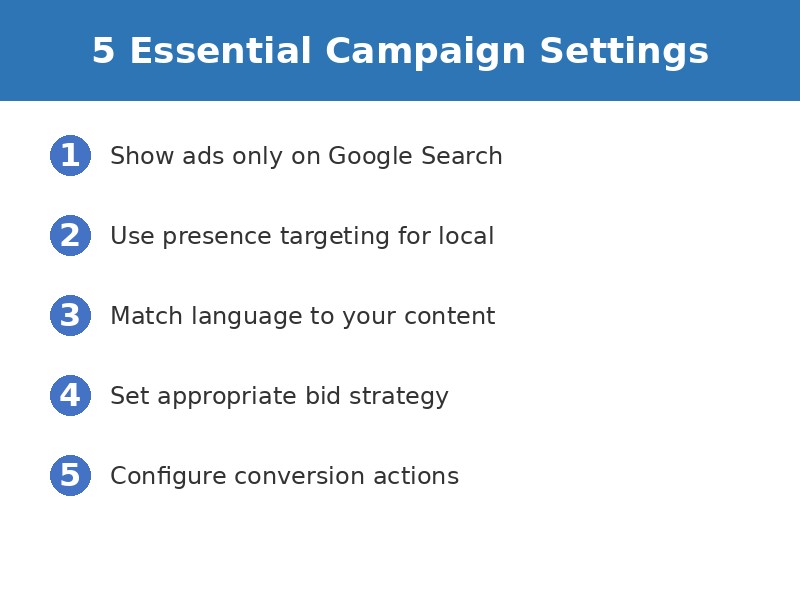
Your bidding strategy determines how Google manages your ad spend. Understanding the implications of each option is crucial for campaign success:
Maximize Clicks
This strategy prioritizes driving traffic volume within your budget. It’s useful for brand new campaigns that need to build data, but it doesn’t optimize for conversion quality. Use this sparingly and only in the initial data-gathering phase.
When to use: New campaigns with less than 30 conversions in the past 30 days.
Maximize Conversions (tCPA)
Once you have conversion data, this strategy becomes powerful. Target CPA (tCPA) tells Google the maximum amount you’re willing to pay for a conversion. The algorithm then optimizes bids to get you as many conversions as possible at or below your target cost.
When to use: Lead generation campaigns where all leads have similar value. Requires at least 30 conversions in the past 30 days for optimal performance.
Maximize Conversion Value (tROAS)
For e-commerce or businesses where conversion values vary significantly, target ROAS (return on ad spend) optimizes for revenue rather than just conversion volume. You specify a target return, and Google adjusts bids to maximize total conversion value while maintaining that return ratio.
When to use: E-commerce, SaaS with different pricing tiers, or any business with varying transaction values. Requires conversion value tracking.
Example: If you set a 400% tROAS, Google will try to generate $4 in revenue for every $1 you spend on ads.
Target Impression Share
This strategy focuses on visibility rather than conversions. It’s primarily used for brand awareness campaigns where you want to ensure your ads appear in a specific percentage of eligible auctions.
When to use: Brand protection campaigns, competitive conquesting, or awareness initiatives. Not recommended for most direct response campaigns.
After selecting your bidding strategy, you’ll need to configure your campaign settings to ensure optimal performance.
Looking to understand more about paid advertising metrics? Read our guide on essential Meta Ads metrics which shares similar performance measurement principles. For the broader AI-driven bidding context shaping paid search in 2026, our guide to the 7 trends defining search in 2026 is worth reading alongside this.
Critical Campaign Settings You Can’t Overlook
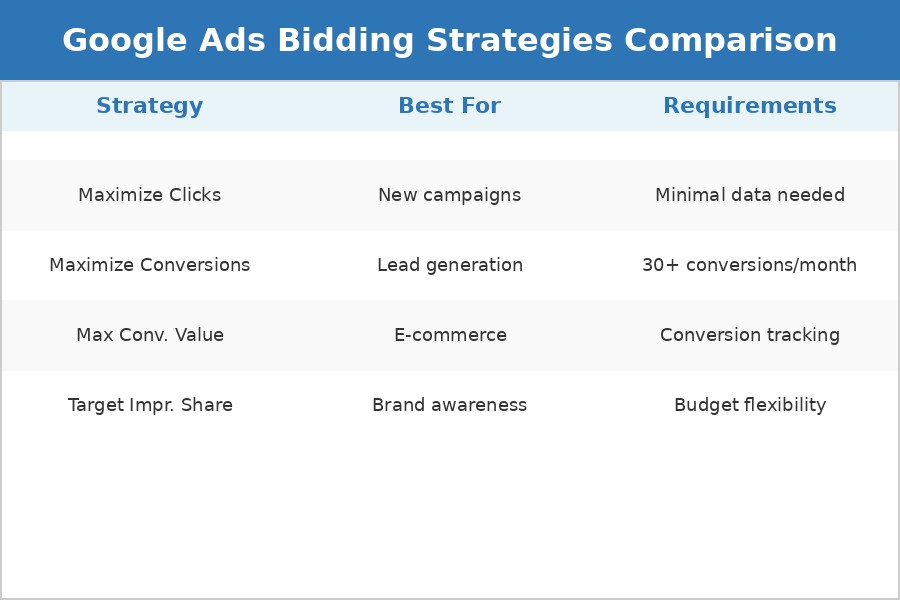
Several campaign settings have outsized impact on performance but are often misconfigured:
Network Settings
By default, Google includes the Search Partners Network and Display Network. For most search campaigns, you should show ads only on Google Search Results. This ensures your ads appear where users have the highest intent. Search partners and display placements can dilute performance and make optimization more difficult.
Location Targeting: Presence vs. Interest
This setting determines whether you target people physically located in your target area (presence) or people interested in your target area (interest).
Use presence targeting for:
- Local businesses (restaurants, plumbers, dentists)
- Service providers with geographic limitations
- Brick-and-mortar retail
Use interest targeting for:
- Travel and tourism businesses
- Real estate in specific locations
- Events and attractions
For local businesses, this works hand-in-hand with ranking high on Google Maps to maximize local visibility.
Language Targeting
Set this based on the language of your ads and landing pages. Google uses browser language settings and user behavior to determine language, so ensure this aligns with your target audience.
Pro tip: If you serve multiple language markets, create separate campaigns for each language rather than combining them. This allows for better ad copy customization and performance tracking.
Keyword Match Types and Ad Group Theming
Keyword strategy combines two elements: match types and ad group structure.
Starting with Phrase Match
For beginners, phrase match offers the best balance between reach and control. Your ads appear for searches that include the meaning of your keyword, giving you exposure to relevant variations while preventing completely unrelated queries.
Keyword match type evolution:
- Broad Match – Maximum reach, minimum control (use with caution)
- Phrase Match – Balanced approach (recommended for most campaigns)
- Exact Match – Maximum control, minimum reach (use for proven converters)
As you gain experience and data, you can expand into broad match or tighten with exact match depending on performance.
Ad Group Theming for Maximum Relevancy
Group related keywords into tightly themed ad groups. For example, if you’re a plumber, create separate ad groups for “water heater repair,” “drain cleaning,” and “emergency plumbing.”
This structure allows you to:
- Write highly specific ad copy that matches search intent
- Direct users to the most relevant landing page
- Improve Quality Score and reduce cost per click
- Track performance by service line or product category
With your keyword structure in place, you’re ready to craft compelling ad copy that drives clicks and conversions.
Understanding how search engines work is crucial for both paid and organic strategies. Our guide on how keyword and intent matching has evolved gives essential context on why match types matter more than ever. You can also learn more about ranking higher on Google organically to complement your paid campaigns.
Crafting Compelling Ad Copy That Converts
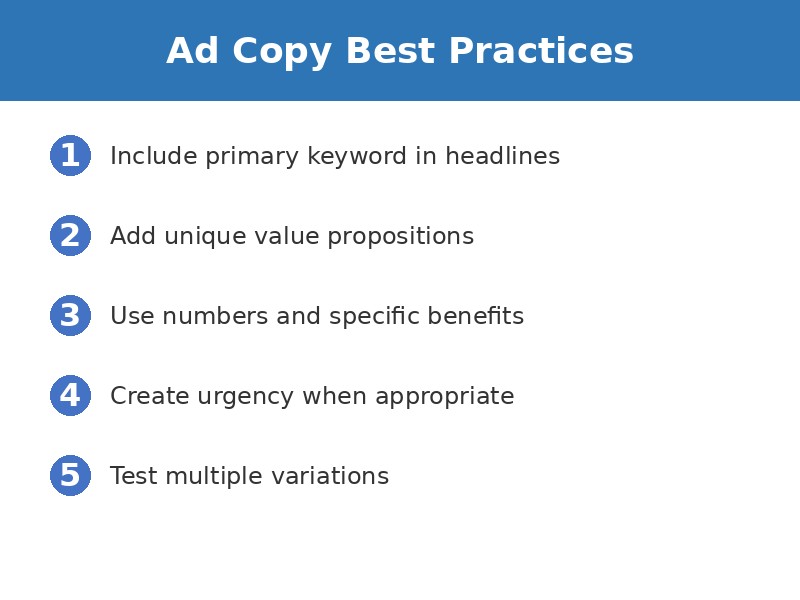
Your ad copy is your first impression—and often your only chance to convince someone to click. Strong ads combine several elements:
Final URLs and UTM Parameters
Always add UTM parameters to your final URLs for precise tracking in Google Analytics. This allows you to see exactly which campaigns, ad groups, and keywords are driving results beyond what Google Ads reports.
Example UTM structure:
https://yoursite.com/landing-page?utm_source=google&utm_medium=cpc&utm_campaign=plumbing_emergency&utm_content=ad_variant_1
Headlines That Capture Attention
You can add up to 15 headlines, and Google will test different combinations. Include your primary keyword, unique value propositions, and specific benefits.
Effective headline formulas:
- Keyword + Benefit: “Emergency Plumbing – 24/7 Service”
- Question + Solution: “Need a Plumber? Same-Day Service”
- Number + Proof: “Trusted by 10,000+ Homeowners”
- Urgency + Action: “Call Now – Licensed Plumbers Available”
- Location + Service: “Denver’s Top-Rated Plumber”
Use numbers, questions, and urgency where appropriate. Consider pinning critical headlines to specific positions to ensure your core message always appears.
Descriptions That Persuade
Your descriptions expand on your headlines with additional details, benefits, and calls to action. Address customer pain points, highlight what makes you different, and create urgency with limited-time offers or scarcity.
Description best practices:
- Lead with the primary benefit or solution
- Include 2-3 supporting benefits or features
- Add social proof (years in business, certifications, awards)
- End with a clear call-to-action
- Match the tone and language of your target audience
Like headlines, you can pin descriptions to control their placement in your ad variations. Once your ads are written, enhance them with ad assets and extensions.
Maximizing Impact with Ad Assets and Extensions
Assets (formerly called extensions) enhance your ads with additional information and links, making them more prominent and clickable. Well-implemented assets can increase CTR by 10-25%.
Essential Ad Assets
Sitelink Assets
Add additional links to specific pages on your website, giving users more options to engage with your business. Use 4-6 sitelinks with compelling descriptions.
Example sitelinks for a plumber:
- Emergency Services – Available 24/7
- Request Free Quote – Same-Day Response
- Customer Reviews – See Why We’re Rated 5 Stars
- Service Areas – Serving Denver Metro Area
Callout Assets
Short snippets highlighting key features. These appear below your description and reinforce your value proposition.
Examples: “24/7 Support” | “Free Shipping” | “Licensed & Insured” | “Money-Back Guarantee”
Structured Snippet Assets
Showcase specific aspects of your products or services in a structured format.
Categories include: Services, Brands, Types, Styles, Amenities, Courses, Destinations, etc.
Call Assets
Add your phone number directly to ads for mobile users. Particularly valuable for emergency services or time-sensitive offers.
Location Assets
Show your business address, phone number, and a map marker. Essential for local businesses with physical locations.
Business Name and Logo
Display your brand identity directly in your ads to build trust and recognition, especially important for brand awareness campaigns.
Managing Assets at Scale
You can manage assets at the account level for consistency across all campaigns or at the campaign level for specific messaging. For most businesses, use account-level assets as your foundation, then add campaign-specific assets for special promotions or unique offerings.
With your assets configured, you’re ready to set your campaign budget and launch.
Setting Budgets and Launching Your Campaign
Your daily budget should be set based on your monthly advertising budget divided by 30.4 (average days per month). However, Google may spend up to 2x your daily budget on high-performing days while staying within your monthly limit.
Budget Calculation Example
If you want to spend $3,000 per month on Google Ads:
- Monthly budget: $3,000
- Daily budget: $3,000 ÷ 30.4 = $98.68 (round to $99)
- Potential daily spend: Up to $198 on peak days
- Guaranteed monthly cap: ~$3,000
Budget Allocation Strategy
Start conservatively, especially if you’re testing new markets or keywords. You can always increase budgets for successful campaigns, but overspending early can deplete your budget before you’ve gathered enough data to optimize effectively.
Recommended approach:
- Week 1: Set budget at 50-75% of target to control costs during learning phase
- Week 2-3: Increase to 100% as you optimize based on initial data
- Week 4+: Scale budget based on performance metrics and target CPA goals
If you’re building your first paid search programme alongside an organic foundation, our proven 90-day plan maps out how to structure the technical and content foundation work that makes paid campaigns compound faster.
Need professional help managing your campaigns? Learn about hiring an SEO and marketing consultant to maximize your advertising ROI.
Frequently Asked Questions
How much should I budget for Google Ads?
How long does it take to see results from Google Ads?
What’s the difference between broad match, phrase match, and exact match keywords?
Should I use landing pages or send traffic to my website?
What bidding strategy should I use for my Google Ads campaign?
How do I track conversions in Google Ads?
The Path to Profitable Campaigns
Setting up profitable Google Ads Search Campaigns isn’t a one-time task—it’s an ongoing process of testing, learning, and optimizing. By following this comprehensive framework from business math through to continuous optimization, you create campaigns built on solid fundamentals.
Remember that the most successful campaigns are those that:
- Start with clear financial goals and unit economics
- Send traffic to dedicated, high-converting landing pages
- Implement accurate conversion tracking from day one
- Use appropriate bidding strategies based on campaign maturity
- Create tightly themed ad groups with relevant keywords
- Write compelling ad copy that speaks to user intent
- Continuously monitor, test, and optimize based on data
The difference between profitable and unprofitable campaigns often comes down to attention to detail in setup and relentless focus on optimization. Start with this foundation, remain patient during the learning phase, and commit to ongoing improvement. Your campaigns will reward your discipline with sustainable, scalable growth.
Just as the future of SEO is constantly evolving, so too must your paid search strategies adapt to changing algorithms and user behaviors. Our guide on what still works in digital marketing in 2026 helps you separate signal from noise as the landscape shifts.

Ready to Launch Your Profitable Google Ads Campaign?
At Harmukh Technologies, we specialize in creating data-driven digital marketing strategies that deliver measurable results. Our team of certified Google Ads experts helps businesses of all sizes build profitable campaigns that scale sustainably.
Get a free campaign audit and personalized strategy session.
Related Articles
- 📊 Essential Meta Ads Metrics You Should Monitor
- 🎯 Integrated SEO, SEM & Social Strategy for Better ROI
- 📱 How to Rank High on Google Maps in 2026
- 🔍 Backlinks in SEO: How They Work and Why They Matter
- 💰 How to Set Up a Successful Performance Marketing Campaign
- 📋 Google Tag Manager Conversion Tracking Guide 2026
- 🗓️ Proven 90-Day SEO Plan to Boost Rankings and Traffic
[…] see our Google Ads Bidding Strategies guide. For the full Google Ads Search foundation, our complete Google Ads Search guide covers the campaign structure this tracking sits […]