
If you are interviewing for a role in programmatic advertising — whether as a media buyer, ad operations lead, trading desk analyst, or at a digital agency — expect the conversation to go well beyond “what is programmatic?” Interviewers at serious organisations will test your ecosystem knowledge, platform fluency, measurement understanding, troubleshooting ability, and how clearly you can explain complex concepts to non-technical stakeholders. In 2026, they will also probe your understanding of the post-cookie landscape, AI-driven bidding, CTV growth, and first-party data strategy — because these are no longer emerging topics, they are operational realities.
This guide covers 50+ of the most commonly asked programmatic advertising interview questions — plus a dedicated section on DV360 platform mechanics and real certification exam questions — organised by category, with guidance on how to think about each answer and why interviewers ask it. Use it as a preparation checklist, not a script. The questions that differentiate candidates are the ones where you demonstrate reasoning, not just recall.
If you want to understand how programmatic fits into a broader digital marketing context, our integrated SEO, SEM, and social strategy guide covers how paid channels connect to organic and content. And for the performance marketing campaign framework that programmatic sits within, see our performance marketing campaign setup guide for 2026.
Core Technical Questions
1. What is a click macro? Why is it used?
A click macro is a placeholder in an ad tag or tracking URL that gets dynamically replaced with actual data — such as a click timestamp, destination URL, or campaign ID — at the moment the ad is served. It is used to track ad clicks, capture metadata, and attribute performance accurately across platforms.
Why interviewers ask this: Tracking is the foundation of all programmatic work. Weak fundamentals here signal weak fundamentals everywhere.
2. What is brand safety? Why is it important? Give an example.
Brand safety refers to ensuring that an advertiser’s ads do not appear alongside content that could damage their reputation — extremist material, adult content, graphic violence, or politically sensitive contexts. Example: using verification tools like DoubleVerify, IAS (Integral Ad Science), or MOAT to block placements on unsafe inventory. In 2026, brand safety has expanded to include AI-generated content environments — advertisers are now specifically excluding ad placements within AI-generated article farms and low-quality programmatic content networks.
Why interviewers ask this: Programmatic offers scale — but also risk. Understanding how to protect brand reputation is fundamental for any client-facing role.
3. How do you implement pixels? What tools do you use for web and app?
Web pixel implementation: generate the pixel code from the platform (Google Ads, Meta, DV360), place it in the site header or footer via Google Tag Manager, configure conversion event variables (e.g., purchase value, lead type), verify it fires correctly using Tag Assistant or GTM Preview mode, and link to your analytics platform. App implementation: use the platform’s SDK (e.g., Google Firebase SDK, Meta SDK), integrate with a Mobile Measurement Partner (MMP) such as AppsFlyer, Adjust, or Branch for attribution, and verify through MMP dashboards and SDK debug logs.
Why interviewers ask this: Correct pixel implementation is the prerequisite for accurate optimisation and client reporting. For how tracking setup connects to the broader campaign structure, see our performance marketing campaign guide — tracking setup is covered as a non-negotiable pre-launch step.
4. How do you verify a pixel is firing correctly? What tools do you use?
For web: use Chrome extensions such as Tag Assistant Legacy or the Meta Pixel Helper, GTM Preview mode, browser developer tools Network tab to check for tag requests, and GA4 DebugView for event verification. For apps: SDK debug logs, MMP dashboard real-time event tracking, and platform-specific tools like Google’s Firebase DebugView.
Why interviewers ask this: Troubleshooting is a real operational responsibility — interviewers want to see that you verify setup rather than assume it works.
5. Who are the key stakeholders in the programmatic advertising ecosystem?
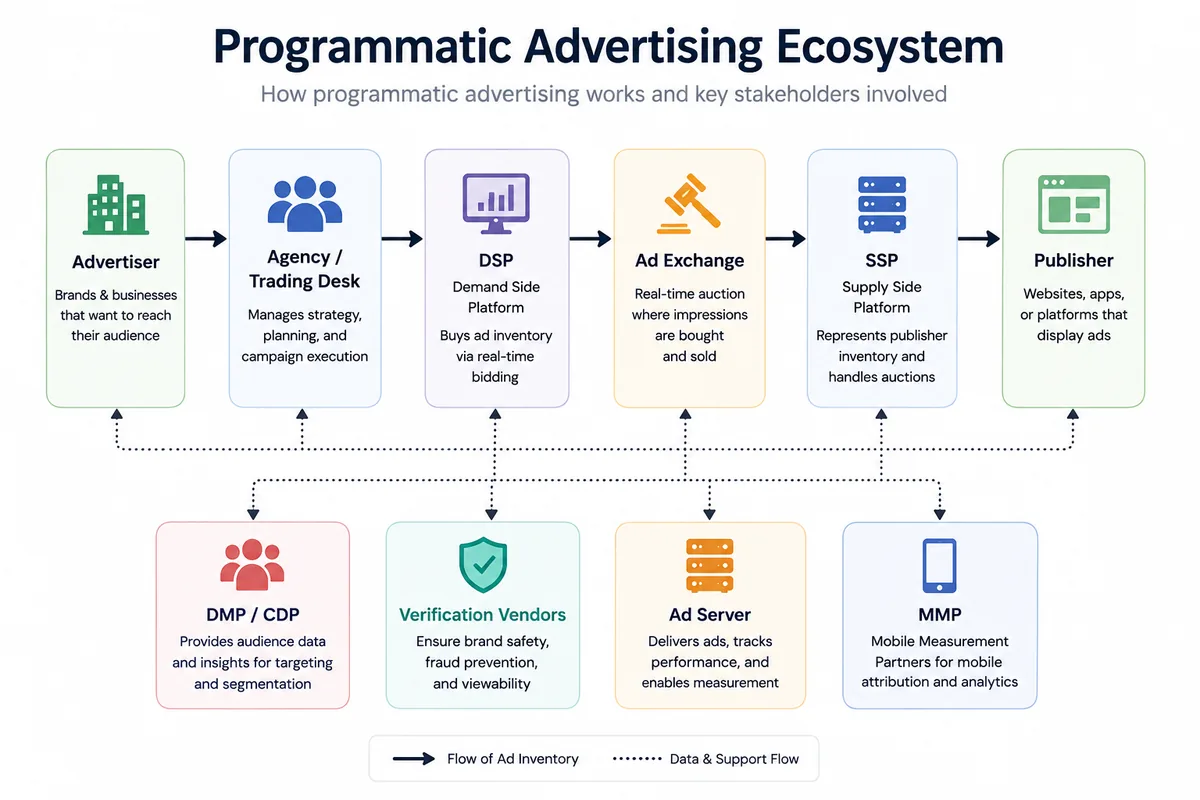
The full ecosystem: Advertiser → Agency/Trading Desk → DSP (Demand Side Platform) → Ad Exchange → SSP (Supply Side Platform) → Publisher. Additionally: DMP/CDP (audience data), Verification Vendors (brand safety and viewability), Ad Servers (campaign management and third-party tracking), and MMPs (mobile attribution). Understanding each stakeholder’s role — and how they interact in a single bid request — is essential for coordination, budgeting, troubleshooting, and supply path optimisation.
Why interviewers ask this: It tests whether you understand the system end-to-end, not just your specific role within it.
6. What is programmatic advertising? Explain it to a layman.
“Programmatic advertising is like a fully automated auction that happens in milliseconds every time a webpage loads. Instead of a sales team manually negotiating ad placements, software automatically evaluates every available ad slot, bids on the ones that match your target audience, and places your ad — all before the page finishes loading.”
Why interviewers ask this: Communication ability matters as much as technical knowledge in client-facing and stakeholder roles. If you cannot explain programmatic clearly to a non-technical person, you cannot brief clients, present strategy, or manage expectations effectively.
7. What is GDPR and how does it affect programmatic advertising?
GDPR (General Data Protection Regulation) is the EU’s data privacy framework governing how personal data is collected, processed, stored, and transferred. In programmatic, it affects audience targeting (consent required for cookie-based targeting), data sharing across the supply chain (every vendor in the bid stream must have a lawful basis for processing data), cross-border data flows (EU data cannot be transferred to non-adequate countries without safeguards), and consent management (publishers must implement a CMP — Consent Management Platform). In 2026, with third-party cookies fully deprecated in Chrome, GDPR compliance has become even more central — the industry has shifted toward consent-based first-party data strategies, contextual targeting, and Privacy Sandbox APIs.
Why interviewers ask this: Compliance is non-negotiable. Programmatic roles at agencies and advertisers require fluency in privacy regulation, not just awareness of it.
8. What is ads.txt and why does it matter?
ads.txt (Authorised Digital Sellers) is a publicly accessible text file that publishers host on their domain listing every authorised seller of their inventory. Advertisers and DSPs can check this file before purchasing inventory to verify they are buying from a legitimate, authorised source — reducing domain spoofing and unauthorised reselling. Including only ads.txt-compliant publishers in your inventory targeting is a supply chain transparency and fraud prevention measure. Excluding non-compliant publishers eliminates a significant source of invalid traffic.
Why interviewers ask this: Supply path transparency is a mature operational expectation — not a niche topic.
9. What is the difference between an Ad Network and an Ad Exchange?
An Ad Network aggregates publisher inventory, packages it, sets fixed or negotiated prices, and sells it to advertisers — often with less targeting granularity and less transparency on specific placements. An Ad Exchange is a real-time marketplace where publisher inventory is auctioned to the highest bidder through RTB — providing more transparency, more targeting granularity, and market-driven pricing. Most programmatic buying today flows through ad exchanges via DSPs rather than through traditional ad networks.
Why interviewers ask this: Ecosystem knowledge — understanding the infrastructure of the supply chain is expected in any serious programmatic role.
10. What is a DMP? What is a CDP? Why is CDP gaining more traction in 2026?
A DMP (Data Management Platform) collects, organises, and segments audience data — typically anonymous, cookie-based, third-party data — for targeting at scale. A CDP (Customer Data Platform) unifies known customer data across online and offline touchpoints into a persistent, individual-level customer profile. CDPs use first-party data — CRM records, purchase history, app behaviour, email engagement — rather than anonymous third-party segments. CDPs are gaining significant traction in 2026 because third-party cookies are fully deprecated in Chrome, making cookie-based audience targeting from DMPs largely obsolete. First-party data from CDPs is now the primary data layer for advanced audience targeting. Example CDPs: Segment, Tealium, Treasure Data, Salesforce Data Cloud.
Why interviewers ask this: The data ecosystem shift from DMP to CDP is one of the most important structural changes in programmatic since RTB. Not knowing this in 2026 is a significant gap.
11. What are MMPs? How do they work? Name some and which is better?
Mobile Measurement Partners (MMPs) are third-party platforms that provide independent attribution for mobile app campaigns — tracking installs, in-app events, and ROAS across multiple ad networks and channels. They work by using a unique device fingerprint or probabilistic matching when the user first engages with an ad, then verifying the install or event against that fingerprint when it occurs in the app. Leading MMPs: AppsFlyer, Adjust, Branch, Singular. “Better” depends on: regional support (AppsFlyer has particularly strong coverage in India and Asia), integrations with your media partners, pricing model, privacy compliance features (ATT/SKAN support for iOS), and reporting capabilities.
Why interviewers ask this: Mobile is a primary advertising channel — MMP knowledge is expected for anyone buying or managing app campaigns.
12. What is the difference between affinity and in-market audiences?
Affinity audiences are users with demonstrated long-term interest in a broad topic or lifestyle category — “sports enthusiasts,” “frequent travellers,” “cooking lovers.” They are most useful for awareness and brand-building campaigns where you want broad reach within a relevant interest group. In-market audiences are users showing active, recent purchase intent signals — “in-market for a car,” “comparing insurance plans,” “searching for a laptop.” They are closer to a conversion decision and most valuable for direct-response campaigns.
Why interviewers ask this: Audience segmentation strategy is central to programmatic campaign planning — confusing these two types leads to wasted spend on the wrong objectives.
13. What are PG (Programmatic Guaranteed) deals? How do you set one up?
A Programmatic Guaranteed deal is a fixed-price, pre-negotiated inventory commitment between an advertiser (or agency) and a publisher — executed programmatically rather than via a manual insertion order. The advertiser gets guaranteed delivery of a defined volume of impressions at a fixed CPM, and the publisher reserves the inventory. Setup steps: negotiate terms with the publisher (CPM, impression volume, dates, targeting parameters), create the deal in the DSP (DV360 Marketplace) and confirm with the publisher’s SSP, traffic creatives to the deal’s line item, set up tracking and frequency caps, and monitor pacing from launch.
Why interviewers ask this: PG deals are increasingly common for premium brand campaigns — knowing how they work operationally distinguishes experienced practitioners from those who only know open auction. (See also the two PG-specific certification exam questions further down this page.)
14. Troubleshooting steps if a PG line item is not serving?
Systematic troubleshooting: verify the deal ID is entered correctly in the DSP; check flight dates are active; confirm budget is not exhausted or daily cap is not too restrictive; check creative approval status — unapproved creatives will block delivery; verify targeting is not too restrictive and conflicts with deal parameters; check frequency caps are not limiting reach; confirm the publisher has the inventory available and the deal is active on their SSP; review pacing settings (ASAP vs even delivery). If all setup appears correct, contact the publisher’s technical team to confirm the deal status on their end.
Why interviewers ask this: PG troubleshooting is a real operational task — methodical problem-solving ability is what they are evaluating.
15. What is DCO (Dynamic Creative Optimisation)? Which advertisers should use it?
DCO is the automated customisation of ad creative elements — headline, image, CTA, offer — in real time based on audience data, context, or behaviour signals. Rather than serving a single static creative, DCO serves the most relevant combination for each individual impression. Advertisers who benefit most: e-commerce (product-specific ads based on browsing history), travel (dynamic destination/price messaging), retail (personalised offers), financial services (segment-specific messaging). DCO requires a strong data foundation — it works well when you have meaningful audience segments and enough creative variants to test.
Why interviewers ask this: DCO demonstrates understanding of personalisation at scale — a key differentiator for sophisticated programmatic practitioners.
16. What are UTM parameters? Why are they used?
UTM parameters are query string additions to URLs — utm_source, utm_medium, utm_campaign, utm_content, utm_term — that allow analytics platforms like GA4 to attribute traffic and conversions to specific campaigns, channels, and creative elements. In programmatic campaigns, every ad URL should include UTM parameters so that GA4 can distinguish between traffic from DV360, Google Ads, Meta, and other sources — and attribute conversions accurately.
Why interviewers ask this: Attribution and measurement are foundational — not knowing UTM parameters in a programmatic role is a significant gap.
17. What are viewable impressions (Active View)? Why does viewability targeting matter?
A viewable impression (per MRC standard) is one where at least 50% of the ad’s pixels are in view on screen for at least one second (display) or two seconds (video). Google’s Active View measures this in real time. Targeting viewability means setting a minimum viewability threshold — e.g., only bid on inventory where 70%+ of impressions are historically viewable. This improves the quality of impressions purchased and is a standard requirement for brand awareness campaigns where an ad that was never seen delivers zero value.
Why interviewers ask this: Viewability is a major KPI for brand campaigns — understanding it shows measurement maturity.
18. What causes discrepancies between DSP and Google Analytics traffic data?
Common causes: different attribution models (last-click vs. data-driven vs. view-through); ad blockers preventing GA4 tags from firing; missing or incorrect UTM parameters on ad URLs; different time zone settings between platforms; DSP counting server-side impressions before the page loads while GA4 counts only completed page views; delayed data processing; invalid traffic filtered by one platform but not another; GA4 session-based counting versus DSP click-based counting.
Why interviewers ask this: Data discrepancies are a daily operational reality — showing a systematic approach to diagnosing them demonstrates real campaign experience.
19. What is a cachebuster macro? What happens if it is not implemented?
A cachebuster macro inserts a unique, randomly generated value into a tracking URL each time an ad is served — preventing browsers or ad servers from caching and re-serving the same response. Without a cachebuster, the same impression or click might be counted multiple times (if the cached response is re-fired), or tracking events may fail to register correctly, skewing reporting and causing optimisation decisions to be based on inaccurate data.
Why interviewers ask this: It is a detail-level technical question that reveals whether a candidate understands ad tag mechanics at the operational level.
20. What are verification vendors? Name key ones and what they do.
Verification vendors audit the quality, context, and delivery of programmatic ad impressions. They verify: viewability (was the ad actually seen?), brand safety (did it appear next to appropriate content?), geographic accuracy (was it served in the right country?), invalid traffic/fraud (was it served to real humans?). Key vendors: DoubleVerify, IAS (Integral Ad Science), MOAT (by Oracle). These tools integrate with DSPs and ad servers to provide independent measurement and can be used to block or filter inventory in real time based on defined thresholds.
Why interviewers ask this: Verification is now a standard component of any serious programmatic buy — not knowing these vendors is a gap.
21. What is native advertising? How does it work in programmatic?
Native ads are ad units designed to match the look, feel, and editorial format of the platform where they appear — in-feed article recommendations, sponsored content listings, or in-app content units. They are less disruptive than standard display and typically generate higher engagement rates. In programmatic, native ads are bought through native-specific SSPs (e.g., Outbrain, Taboola, TripleLift) via DSPs in the same RTB framework as display. The creative assets — headline, image, description, logo — are submitted separately and the publisher’s platform assembles the final unit in its own visual style.
Why interviewers ask this: Modern programmatic includes native as a standard format — knowing this shows breadth beyond standard display and video.
22. What is the role of cookies in programmatic? How has this changed in 2026?
Cookies historically enabled user tracking across websites — powering remarketing, frequency capping, audience segmentation, and cross-site attribution in programmatic. Third-party cookies (set by ad networks and tracking vendors, not by the visited website itself) were the primary mechanism for cross-site audience targeting. In 2026, third-party cookies are fully deprecated in Chrome — completing a process that began in 2020. The programmatic industry has adapted through: first-party data activation via CDPs, contextual targeting, Google’s Privacy Sandbox APIs (Topics API, Protected Audience API), and identity solutions like Unified ID 2.0. Server-side tracking via Conversions API has replaced browser-side pixels as the most reliable measurement mechanism.
Why interviewers ask this: Cookie deprecation is the single biggest structural change in programmatic measurement in a decade — not knowing this in 2026 is a critical knowledge gap.
23. What is RTB (Real-Time Bidding)? Explain it simply.
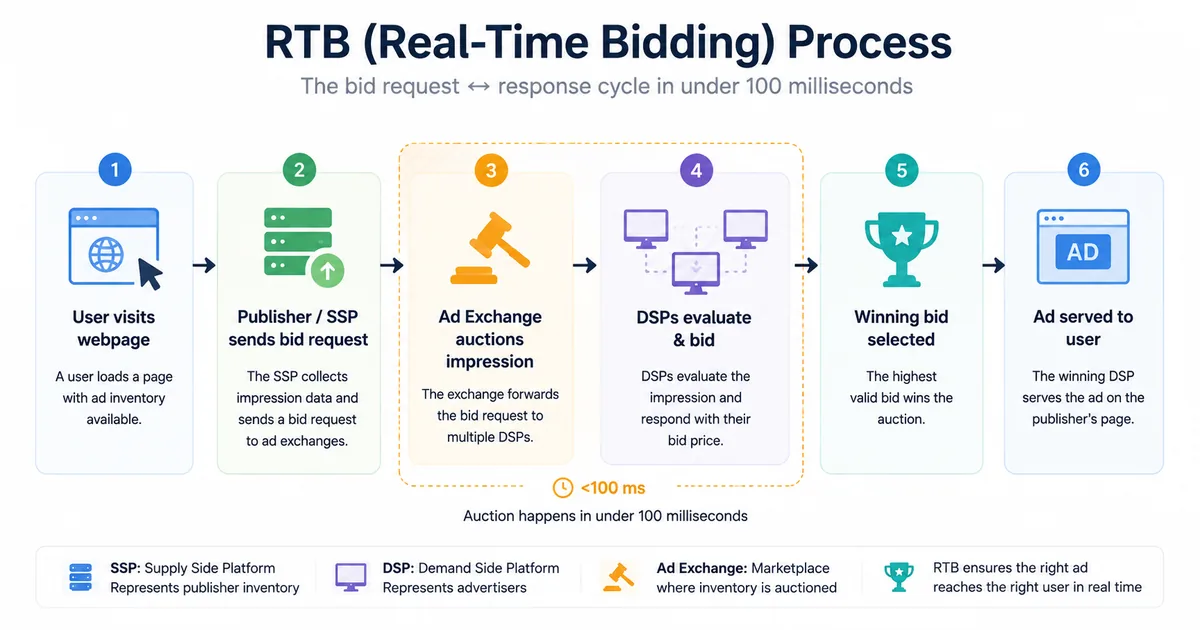
“RTB is a live auction that happens in under 100 milliseconds every time a webpage loads. When a user visits a page with an ad slot, the publisher’s SSP sends a bid request to multiple DSPs simultaneously, including data about the user and the context. Each DSP evaluates the impression against its advertisers’ targeting criteria and bids the maximum amount each advertiser is willing to pay. The highest bidder wins the impression and their ad is served — all before the page finishes loading.”
Why interviewers ask this: RTB is the operational foundation of programmatic — being able to explain it simply shows both understanding and communication ability.
24. What is the difference between open auction, PMP, and PG buying?
Open auction (RTB): all buyers compete for available inventory in real time; lowest cost, least control, highest fraud risk. Private Marketplace (PMP): invite-only deal where specific advertisers are given preferential access to premium publisher inventory at negotiated floors; better quality, more control, moderate cost. Programmatic Guaranteed (PG): fixed-price, guaranteed impression volume committed in advance — the programmatic equivalent of a traditional direct deal; highest quality and control, highest cost, no competition.
Why interviewers ask this: Knowing when and why to use each buying model is fundamental strategic knowledge in programmatic.
| Feature | Open Auction | PMP | Programmatic Guaranteed |
|---|---|---|---|
| Control | Lowest | More | Highest |
| Inventory | Broad | Curated | Reserved |
| Buying model | Dynamic auction | Private access | Fixed agreement |
| Cost | Lower | Medium | Higher |
| Inventory certainty | Lower | Medium | Highest |
Key takeaway: As you move from Open Auction → PMP → Programmatic Guaranteed, cost generally increases, but so do control and inventory certainty.
25. Single DSP vs multiple DSPs — which do you recommend and why?
Single DSP benefits: unified reporting, simpler operations, consolidated frequency management, stronger negotiating power with vendors. Multiple DSP benefits: access to different inventory pools, platform diversification, ability to test platform performance. Recommendation depends on: campaign scale (smaller budgets rarely justify the overhead of multiple DSPs), campaign type (CTV and audio may require specialist DSPs alongside a general one), and client sophistication. For most Indian businesses running standard display and video campaigns, a single well-managed DSP delivers better outcomes than fragmented spend across multiple platforms.
Why interviewers ask this: Strategic judgement — not just operational knowledge — is what senior roles require.
26. What are the troubleshooting steps for high bounce rate traffic from an open auction campaign?
Systematic approach: first, verify tracking is correct — confirm GA4 is attributing sessions accurately and UTMs are properly configured. Then: check targeting — is it too broad, targeting irrelevant demographics or geographies? Check creative-landing page alignment — does the ad message match what the landing page delivers? Review placement exclusions — are low-quality domains, app traffic, or content farm inventory included? Check for invalid traffic — use verification vendor data to identify suspicious traffic patterns. Check device/mobile — is the landing page slow or broken on mobile? Review frequency caps — overly exposed audiences often bounce at high rates.
Why interviewers ask this: Real campaign problems require structured diagnostic thinking — this question evaluates operational maturity.
DV360 Interview Questions: The Complete Set
DV360 (Display & Video 360) is Google’s enterprise DSP and the platform most programmatic interviews probe hardest. This section pulls together every DV360-specific question in this guide — foundations, platform mechanics, and what’s changed in 2026 — so you can prepare it as one block rather than hunting across the article.
1. DV360 vs Google Ads — what are the key differences and when would you use each?
Google Ads is a self-serve platform primarily for search, display, and YouTube within Google’s own inventory ecosystem. DV360 is an enterprise-grade DSP that accesses inventory across multiple exchanges, supports programmatic guaranteed and private marketplace deals, integrates with third-party data providers and DMPs, and offers advanced cross-channel planning across display, video, audio, CTV, and DOOH. Use Google Ads for straightforward search and display campaigns, direct response, and smaller budgets. Use DV360 for large brand campaigns, multi-format and multi-exchange buying, connected TV, and where you need unified frequency management across channels.
Why interviewers ask this: Platform selection judgement is a core skill — choosing the wrong tool creates unnecessary cost and complexity.
2. What is the DV360 account hierarchy?
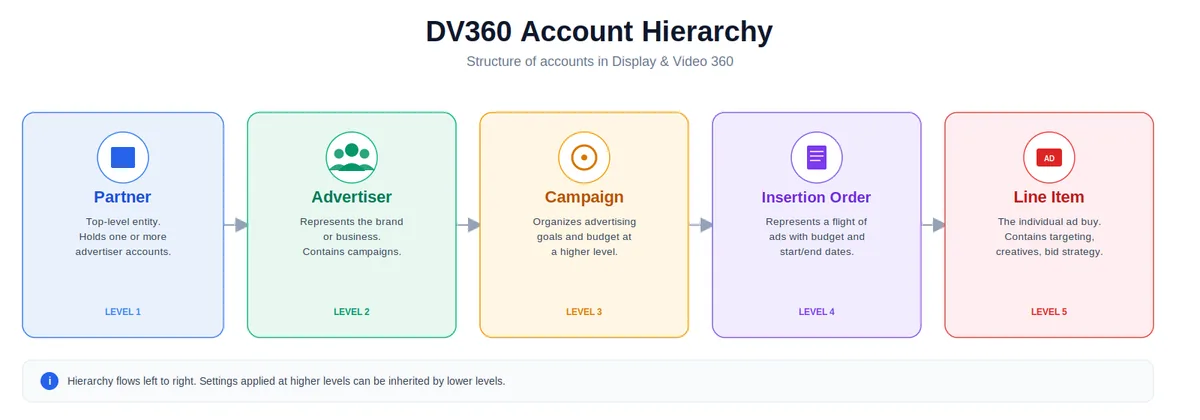
DV360 is structured in five levels, from broadest to most granular: Partner (the top-level account — usually an agency or holding company, controlling billing and global settings) → Advertiser (a specific brand or client, where GA4 and Campaign Manager 360 connections and Floodlight configurations live) → Campaign (a specific initiative with its own goal and budget) → Insertion Order (controls budget, flight dates, and high-level targeting within a campaign) → Line Item (the most granular level — specific targeting, bidding strategy, and creatives).
Why interviewers ask this: account structure questions test whether you’ve actually built campaigns in the platform, not just read about it.
3. What targeting capabilities does DV360 offer beyond Google Ads?
Standard targeting available in both: demographics, geography, device, placement, contextual, and remarketing. DV360-specific capabilities: integration with external DMPs and CDPs, private marketplace (PMP) and programmatic guaranteed deal targeting, cross-exchange custom audience segments, connected TV and DOOH inventory targeting, advanced frequency management across exchanges, and deal-level reporting.
Why interviewers ask this: Platform differentiation shows you understand which tool is right for which campaign objective and audience strategy.
4. What creative formats are available in DV360? What are third-party tag creatives?
DV360 supports: display (static, animated HTML5, rich media), in-stream and out-stream video, native, audio, connected TV, programmatic guaranteed direct, and DOOH. A third-party tag creative is an ad unit served via a tag from an external ad server — such as Campaign Manager 360, Sizmek, or Flashtalking — rather than uploaded directly to DV360. This allows independent measurement, creative versioning, and verification from the third-party ad server independently of the DSP’s own reporting.
Why interviewers ask this: It tests platform familiarity and understanding of how ad serving and measurement stack together.
5. What’s the difference between an Insertion Order and a Line Item?
An Insertion Order (IO) sits within a campaign and controls budget, flight dates, and high-level targeting parameters — think of it as the container for a phase or channel of a campaign. A Line Item sits inside an IO and holds the granular detail: specific audience targeting, bidding strategy, creative assignment, and inventory settings. A single campaign might have multiple IOs (one for video, one for display), and each IO can contain multiple line items testing different targeting or creative combinations.
Why interviewers ask this: confusing these two is one of the most common junior-level mistakes — it signals whether you actually understand campaign structure or just recognize the terms.
6. What are the prerequisites for setting up a YouTube campaign in DV360?
Prerequisites: a linked Google Ads account with a connected YouTube channel; video creative assets meeting YouTube format specifications (skippable in-stream minimum 12 seconds, non-skippable 15-20 seconds, bumper ads 6 seconds); GA4 or Google Ads conversion tracking linked; audience lists imported from Google Ads if using remarketing; brand safety settings configured; frequency caps defined; CPV (cost per view) or CPM bidding strategy selected based on objective.
Why interviewers ask this: Cross-channel video buying is a standard capability — knowing the setup requirements shows platform fluency beyond display.
7. What changed with YouTube buying in DV360 in 2026?
Google retired YouTube video action line items in February 2026, shifting advertisers toward Demand Gen campaigns run through DV360 for YouTube performance objectives. Demand Gen consolidates what used to be separate video action and discovery-style formats into a single, more automated campaign type with broader creative and placement flexibility.
Why interviewers ask this: anyone claiming YouTube/DV360 experience should know the current campaign type — recommending a retired format is an immediate red flag.
8. How is DV360 changing audience targeting in 2026?
DV360 is replacing legacy Audience Expansion with Lookalike Audiences for YouTube video reach and video view campaigns. Unlike the old system (capped at 1% scale and auto-migrated), Lookalike Audiences require manual setup starting mid-2026, with three scale options — Narrow (2.5%), Balanced (5%), or Broad (10%) — and use more advanced semantic similarity matching, with automatic exclusion of the original seed list so targeting focuses on genuinely new prospects.
Why interviewers ask this: existing settings won’t carry over automatically, so this is a real operational task a media buyer needs to handle proactively, not passive platform knowledge.
9. How is DV360’s brand safety approach evolving in 2026?
DV360 is deprecating its legacy digital content labels (aside from “Content not yet rated”) in favor of Inventory Modes and content themes — a more structured brand safety framework replacing a system that had been foundational to the platform for years.
Why interviewers ask this: brand safety questions are already common elsewhere in this guide; knowing that the underlying mechanism is actively changing shows you’re tracking the platform, not just its fundamentals.
10. What reporting changes has DV360 introduced in 2026?
DV360 is migrating Floodlight and Inventory Availability reports from legacy offline reporting to instant reporting, with a phased rollout beginning in mid-2026. This continues a broader shift DV360 has been making since 2024, moving report types out of the older offline system entirely.
Why interviewers ask this: faster, more current reporting changes how quickly you can catch and troubleshoot delivery or pacing issues — a practical operational advantage worth being able to speak to.
DV360 change details above verified against Google’s official Display & Video 360 documentation as of August 2026 — Google ships platform updates on a rolling basis, so confirm exact rollout dates in your own account before an interview.
DV360 & Google Ads Certification Exam Practice Questions
These read differently from the interview questions above — they’re phrased exactly as they appear on certification exams, including embedded answer choices, because that’s how people actually search for them: checking a specific answer mid-exam, not preparing for a conversation.
1. An advertiser is setting up a Programmatic Guaranteed deal and needs to include additional fees for using a third-party verification service. Where should these be added?
These fees belong under Partner Costs, not folded into the negotiated media rate. DV360 defines Partner Costs as any campaign expense other than the media cost (buying the impressions themselves) and the data fee (third-party audience data) — and Google’s own DV360 API documentation specifically lists third-party ad serving verification fees (DoubleVerify, IAS, Scope3/Adloox) as a Partner Cost example, alongside fees for using DV360 itself or a third-party ad server. These are configured as either a flat CPM fee or a percentage of media spend, depending on how the vendor bills. Keeping this separate from the media rate matters for the PG deal specifically: the publisher agreed to a fixed price for the inventory itself, and bundling a verification fee into that number would misrepresent the actual cost of the guaranteed media.
2. How do Programmatic Guaranteed deals differ from standard Deal IDs?
Correct answer: Programmatic Guaranteed deals are negotiated upfront with required spend and targeting parameters. The buyer and seller agree in advance on price, impression volume, flight dates, and targeting before the deal goes live — that upfront commitment is what defines a PG deal, as confirmed in Google Ad Manager’s own documentation on Programmatic Guaranteed deals. The other common answer choices are incorrect: you can edit audience targeting on standard Deal IDs after they’re live (PG deals are actually the more locked-down structure, not standard deal IDs); conversion pixels can run on Programmatic Guaranteed deals, tracking isn’t restricted by deal type; and a “required minimum spend” isn’t a defining feature of standard deal IDs specifically — it’s the negotiated commitment that’s unique to PG.
3. A media planner is launching a brand campaign and requires a committed volume reservation within a specific, curated list of premium digital radio stations. Which inventory source allows the publisher to reserve this capacity at a pre-negotiated rate?
Correct answer: Programmatic Guaranteed (PG). The scenario describes the exact definition of a PG deal: a committed, reserved volume of inventory from a specific, curated publisher list, sold at a pre-negotiated fixed rate rather than through open auction competition. Preferred Deals offer a similar pre-negotiated rate but without the reservation guarantee — the buyer has first-look access but the publisher can still sell that inventory elsewhere if the buyer passes. The reservation commitment specifically is what points to PG over any other deal type, including for premium formats like curated radio or CTV inventory.
Strategic and Conceptual Questions
Beyond technical execution, senior programmatic roles require strategic understanding of how the channel fits into the broader marketing mix. Here are the key conceptual areas you should be prepared to discuss:
What are the key advantages of programmatic advertising?
Scale, automation, real-time optimisation, audience-first targeting across multiple channels, data-driven decision making, and measurable ROI. Compared to traditional media buying, programmatic eliminates manual negotiation, enables precise audience segmentation, and allows continuous campaign optimisation based on performance data.
What are the key challenges in programmatic advertising in 2026?
The five most significant challenges in 2026: third-party cookie deprecation and the transition to first-party data and Privacy Sandbox APIs; ad fraud and invalid traffic despite improved verification tooling; brand safety at scale as AI-generated content proliferates; attribution complexity across increasingly fragmented consumer journeys; and rising CPMs in premium inventory categories as more budgets shift from open auction to PMP and PG. Understanding these challenges — and having a considered position on each — is what distinguishes senior candidates from junior ones.
What are the key trends shaping programmatic in 2026?
Connected TV (CTV) and streaming audio are the fastest-growing programmatic channels — both in India and globally. Retail media networks (Amazon, Flipkart, JioMart) are creating significant new programmatic inventory pools with strong purchase-intent signals. AI-driven creative optimisation (DCO at scale) is increasingly automated. Privacy-preserving measurement (Privacy Sandbox, clean rooms, modelled conversions) is replacing cookie-based attribution. And first-party data activation — building CDP-based audience strategies to replace third-party segment reliance — is the defining capability investment for 2026 and beyond.
How does programmatic fit into an overall digital marketing strategy?
Programmatic is most effective as a complementary channel — layered on top of search and social to extend reach, build brand awareness, and re-engage audiences across the open web and CTV. It excels at upper-funnel awareness (video and display at scale), mid-funnel consideration (contextual and in-market targeting), and lower-funnel retargeting (remarketing to site visitors and CRM audiences). The businesses getting the most value from programmatic are those running it as part of a coordinated multi-channel strategy rather than in isolation — worth reading alongside our guides on Meta ad formats and Meta Ads metrics if your role also spans paid social. Our integrated SEO, SEM, and social strategy guide covers exactly how these channels connect.
In-house vs agency programmatic buying — key differences and considerations?
In-house: greater control over data and strategy, closer alignment with brand teams, potentially lower media costs (no agency margin), but requires significant investment in platform access, staff training, and vendor relationships. Agency: specialist expertise and scale, existing vendor relationships and platform access, faster operational ramp-up, but introduces a layer of margin and potential misalignment of incentives. The decision depends on budget scale (in-house only makes financial sense above a certain spend threshold), internal capability, and how central programmatic is to the business’s marketing strategy.
How to Prepare for Your Programmatic Interview
- Select 15 to 20 core questions from the list above and prepare concise, structured answers for each — using the “what, why, and how would you handle it” framework rather than memorising definitions.
- Have real or hypothetical examples ready. Interviewers at serious organisations consistently ask “tell me about a time when…” — prepare specific campaign scenarios for: troubleshooting a tracking discrepancy, setting up a PG deal, handling brand safety issues, and explaining programmatic to a non-technical client.
- Know your platforms. Be fluent in DV360, Google Ads, and at least one verification vendor. If you have hands-on experience with CM360, Xandr, The Trade Desk, or a leading MMP, mention it — platform breadth is valued. If your role also touches paid social, familiarity with Meta’s ad formats and campaign structure rounds out a cross-channel profile.
- Understand the post-cookie landscape. Any 2026 interview will probe your understanding of cookie deprecation, Privacy Sandbox, first-party data strategy, and CDPs. This is not optional background knowledge — it is a core operational requirement.
- Prepare to explain strategy and trade-offs. The questions that differentiate senior candidates are not definitional — they are strategic. “Why would you use PG over PMP?” “When would you use multiple DSPs?” “How would you rebuild an audience strategy without third-party cookies?” These require genuine thinking, not recall.
For broader digital marketing career preparation, our guide to the top-rated digital marketing courses in 2026 covers the best certifications and learning paths for performance marketing and programmatic roles. And if you are interested in 1-on-1 mentorship covering programmatic, Google Ads, and AI marketing, our digital marketing mentorship programme provides personalised campaign-level guidance.
Frequently Asked Questions
What is the most important skill for a programmatic advertising role in 2026?
In 2026, the most valuable skill is the ability to build and activate first-party data strategies — because third-party cookies are gone, and the advertisers and agencies that can leverage their own customer data effectively have a significant competitive advantage. Beyond data strategy, campaign troubleshooting ability, platform fluency across DV360 and verification vendors, and clear communication with non-technical stakeholders are consistently cited by hiring managers as the differentiating factors between candidates with similar technical knowledge.
What platforms should I know for a programmatic interview?
At minimum: DV360 (Google’s enterprise DSP), Google Campaign Manager 360 (ad server), Google Ads (for comparison context), and at least one verification vendor (DoubleVerify or IAS). Bonus platforms that strengthen a profile: The Trade Desk (increasingly popular for CTV and retail media), Xandr, and one MMP (AppsFlyer or Adjust). In India specifically, familiarity with platforms used by major Indian publishers and exchange partners is a differentiator for agency roles.
What is the difference between a DSP and an SSP?
A DSP (Demand Side Platform) is used by advertisers and agencies to buy ad inventory programmatically — it evaluates bid requests and submits bids on behalf of advertisers based on their targeting criteria and budgets. An SSP (Supply Side Platform) is used by publishers to sell their ad inventory programmatically — it connects to multiple ad exchanges and DSPs to maximise the yield on each impression. The ad exchange sits between them as the marketplace where bids are matched to impressions in real time.
How has cookie deprecation changed programmatic advertising in 2026?
Third-party cookie deprecation in Chrome — completed in 2024 — removed the primary mechanism for cross-site audience tracking, remarketing, and attribution in programmatic. The industry has adapted through: first-party data activation via CDPs (customer data platforms), contextual targeting (serving ads based on page content rather than user history), Google’s Privacy Sandbox APIs (Topics API for interest-based targeting, Protected Audience API for remarketing), and server-side measurement via Conversions API to replace browser-side pixel tracking. Programmatic campaigns that relied heavily on third-party audience segments have seen significant reach and attribution accuracy reductions — those with strong first-party data foundations have largely maintained performance.
What is the difference between CPM, CPC, and CPA buying in programmatic?
CPM (Cost Per Mille/Thousand Impressions): you pay for every 1,000 impressions served, regardless of clicks or conversions — most common for awareness campaigns. CPC (Cost Per Click): you pay only when a user clicks the ad — used for traffic-driving campaigns. CPA (Cost Per Acquisition): you pay only when a defined conversion action occurs — most efficient for direct response campaigns but requires sufficient conversion volume for the algorithm to optimise effectively. In programmatic, most buying is technically CPM-based at the auction level, with automated bidding strategies (Target CPA, Target ROAS) optimising toward the desired outcome.
How do you explain programmatic to a client with no digital marketing background?
“Think of every webpage with an ad slot as a mini auction that happens invisibly in the time it takes a page to load. Your software enters that auction, evaluates whether the person loading that page matches your target customer profile, and bids what your ad is worth to reach that specific person. If you win, your ad appears — if not, someone else’s does. This happens millions of times a day across thousands of websites simultaneously, with the software continuously learning which placements and audiences produce the best results for your business.”
Related Reading
- Types of Meta Ads: Every Facebook & Instagram Ad Format Explained — if your role spans paid social alongside programmatic
- Meta Ads Metrics List — 100 Facebook Ads Metrics + Formulas
- Performance Marketing Campaign Setup Guide 2026
- Integrated SEO, SEM, and Social Strategy for Better ROI
- Top-Rated Digital Marketing Courses 2026